



rykerza
-
Posts
10 -
Joined
-
Last visited
Content Type
Profiles
Articles, News and Tips
Forums
Posts posted by rykerza
-
-
The ALC3226 is ALC292 when you extract it from linux dump. Although your ven/dev might be different. Mine is 80809c20, yours might be 80868c20. Try and see if this works. Patched is made by Joe82
Add this to config.plist
<key>KextsToPatch</key> <array> <dict> <key>Comment</key> <string>AppleHDA ALC 292 #1</string> <key>Find</key> <data> hBnUEQ== </data> <key>Name</key> <string>AppleHDA</string> <key>Replace</key> <data> kgLsEA== </data> </dict> <dict> <key>Comment</key> <string>AppleHDA ALC 292 #2</string> <key>Find</key> <data> hAjsEA== </data> <key>Name</key> <string>AppleHDA</string> <key>Replace</key> <data> AAAAAA== </data> </dict> <dict> <key>Comment</key> <string>AppleHDA ALC 292 #3</string> <key>Find</key> <data> hQjsEA== </data> <key>Name</key> <string>AppleHDA</string> <key>Replace</key> <data> AAAAAA== </data> </dict> </array>
and this 10.10 or SLE if it doesn't work.
 AppleHDAALC.kext.zip
@ Jake Lo
Thanks, but still not working. =(
Added the above code and then installed the kext using kext wizard, however I keep getting a "System extension cannot be used" error.
I've tried repairing the cache and permission using KextWizard but that doesnt seem to help either.
Am I right in assuming that I needed to uninstall VoodooHDA as well as AppleHDADisabler? (I tried the above fix with and without them)
What Kexts should be in my SLE with regards to getting this working?
-
What's your sound card?
VGA is no longer supported.
@ Jake Lo
Thanks for the feedback! Guess Ill have to get an HDMI to VGA converter then =)
The soundcard is the Realtek ALC3226 (which is apparently similar to the ALC292 according to some posts)
I've tried following the below post but still no luck.
https://osxlatitude.com/index.php?/topic/5857-e6540/
I've recently now installed VoodooHDA 2.8.7 which allows sound to work via PC speakers - but I really need the Headphone port to work :\
-
Add this to your clover config under kextsToPatch. Credits goes to gygabyte666
I can confirm it works for HD 4400 too!
<key>Comment</key> <string>Intel 4600/5000 HDMI FB Patch</string> <key>Find</key> <data> BgAmCgEDAwMAAAACAAAAAQAAYAAAAABA2QoAANkKAAAA AAAAAAAAAAAAEAACAAAAMAAAAAEFEgAABAAAhwAAAAIE CQAABAAAhwAAAP8AAQABAAAAQAAAAA8AAAABAQAABAAA AAAAAAAAAAAAAAAAAAAAAAAAAAAA </data> <key>Name</key> <string>AppleIntelFramebufferAzul</string> <key>Replace</key> <data> BgAmCgEDAwMAAAACAAAAAQAAYAAAAABA2QoAANkKAAAA AAAAAAAAAAAAEAACAAAAMAAAAAEFEgAABAAAhwAAAAIE EgAACAAAhwAAAP8AAQABAAAAQAAAAA8AAAABAQAABAAA AAAAAAAAAAAAAAAAAAAAAAAAAAAA </data>
@ Jake Lo
Thanks for this! Allows HDMI to work like a charm, however, is there no way to get VGA D-SUB out working for the HD4400?
I had it working on my HP Hackintosh (Intel HD 3000), yet I cant seem to find any kexts / configs that allow this for this one?
Sound is still not working through the headphone jack & volume control does not work, I've tried the VooDooHDA 2.8.5 with EAPDfix and modified AppleHDA.kext with modified DSDT, yet Im still getting white noise when I plug in the headphones and then silence. Is there something Im missing?
-
which of the 3 methods i described worked for you so other forum members know incase they come across your issue?
My Bios did not allow the disabling of Optimus so I used Clover Configurator to add the "nv_disable=1" option to my config.
-
@ Bronxteck
That did the trick! Thank you so much for all your help! =)
I've attached my working EFI folder for anyone else who would like it!
I now just need to figure out how to get sound & VGA display out working and I'll be a happy man!
*Update
Sound is now working using VoodooHDA-v2.8.6 installer pkg, however no sound out through headphone jack (anybody know how to fix this?)
No VGA output yet though... anyone know of a edited kext for HD4400 to allow display to a 2nd monitor? -
Running A07 Bios - He however has no Nvidia GPU - I have the GT720M with Intel HD4400
No touch screen though :-\
Any other thoughts?
-
@ Bronxtech
Thank you for your help, however I'm unfortunately not as lucky as makzinations.
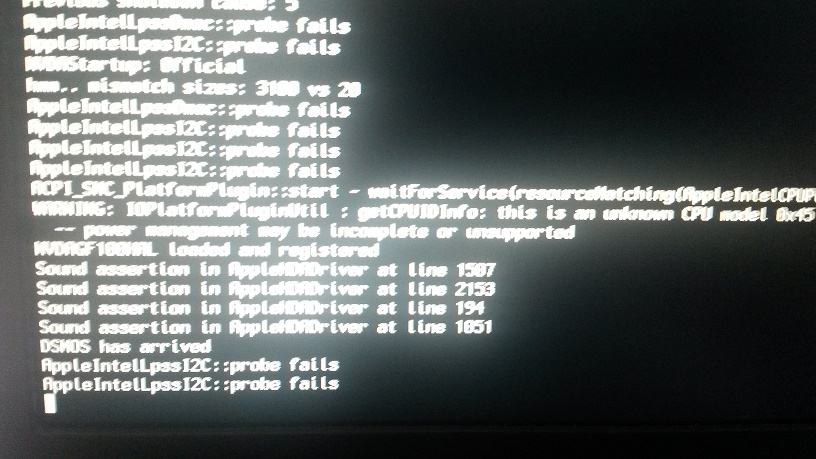
Mine is still ending in a reboot loop.
I added the -v option behind the ones already set and took a photo where it reboots.
I set the Bios to defaults (except for SATA which is set to AHCI and VT-d is disabled)
The screenshot is attached... Am I missing something?
-
*Bump*
Can anyone help?
-
Hi,
I've been desperately trying in vain, to get Yosemite to install on my Dell E5540.
My Specs:Dell E5540 with I5-4310U @2GHz
8GB RAMIntel HD4400 with Nvidia Gforce GT720M
Intel Ethernet I218-LM Network Card
(I've disabled the un-suported Intel WIFI)
AHCI is Enabled for SATA
I've followed the below guide to no avail (along with other guides in the forums)
https://osxlatitude.com/index.php?/topic/6461-guide-e7440-with-clover/&do=findComment&comment=36589
Not once have I been able to get to the Installation screen.
Could someone please enlighten me as to what I'm doing wrong... (With Mavericks I tried the patched Mach_Kernel for 10.9.4 which also resulted in a continuous boot loop)
I've attached my EFI Folder along with the modified DSDT.aml file.
All Im looking to do, is to get LAN / Sound & Video working on Yosemite.


Yosemite (Final) on E5540 I5-4310U (Haswell) using Clover
in The Archive
Posted
@ Jake Lo
I added the above to my config.plist. , removed voodooHDA and HDAdisabler, added a vanilla stock AppleHDA to SLE and rebooted.
I now, unfortunately, have no sound at all.
I've also added the AppleHDAALC.kext you supplied to both SLE and 10.10 (Extra) and still have no sound.
It seems as if the only time sound works is if I use the VoodooHDA kext, however that doesnt allow for sound through the headphone jack.
You are indeed correct though - my dev/id is 80869C20 Sub Device 102805E0 and Codec ID 10EC0292 (different from yours)
Is there a way to patch this?