All Activity
- Today
-
No, but you must have had the iGPU patch in your Monterey bootloader config.
-
It's working now , I did not patch as your opening guide and has no problem with Monterey for years . Is it because utilize Kaby Lake HD620 iGPU id 0x5916 now ? Thank you
- Yesterday
-
Did you patch your BIOS to increase DVMT as explained in the guide's opening post? If you didn't, your E7270's default DVMT is set to 32MB and, indeed, you'll experience KP and resets at startup as the video memory patches are not present in the IGPU's device property settings in the Cover config. You would either need to patch your BIOS or add the patches listed below to your IGPU settings here: framebuffer-stolenmem 00003001 DATA framebuffer-fbmem 00009000 DATA Detailed explanations are available here and don't forget the WEG's user manual.

-
still no luck here and looping, I use Sonoma boot pack #5 and latest Clover r5173 . The boot pack # 5 no longer has 3 items (anyway my E7270 always with Intel card ). The Clover r5173 has no SMChelper under recommended UEFI driver so I manually copy . Please see attached EFI EFIE7270.zip
- Last week
-
Of course you can, that's what I've posted in today's revised bootpack of the Sonoma guide (and that's what's posted in the subsequent Sequoia & Tahoe guides). These 3 items are only useful for legacy Broadcom wireless cards once you've applied the OCLP legacy wireless patch so if you're not using that but, say, an Intel wireless card, that's totally Ok. Just delete the kexts + disable the binary patch in your config file and you'll be good on all subsequent reboots.
-
@Hervé thank you for looking this further, noob question : can we do pre blocked and patch kext on EFI boot pack ? what happen if we leave these pre blocked and patch kext on EFI after installed ?
-
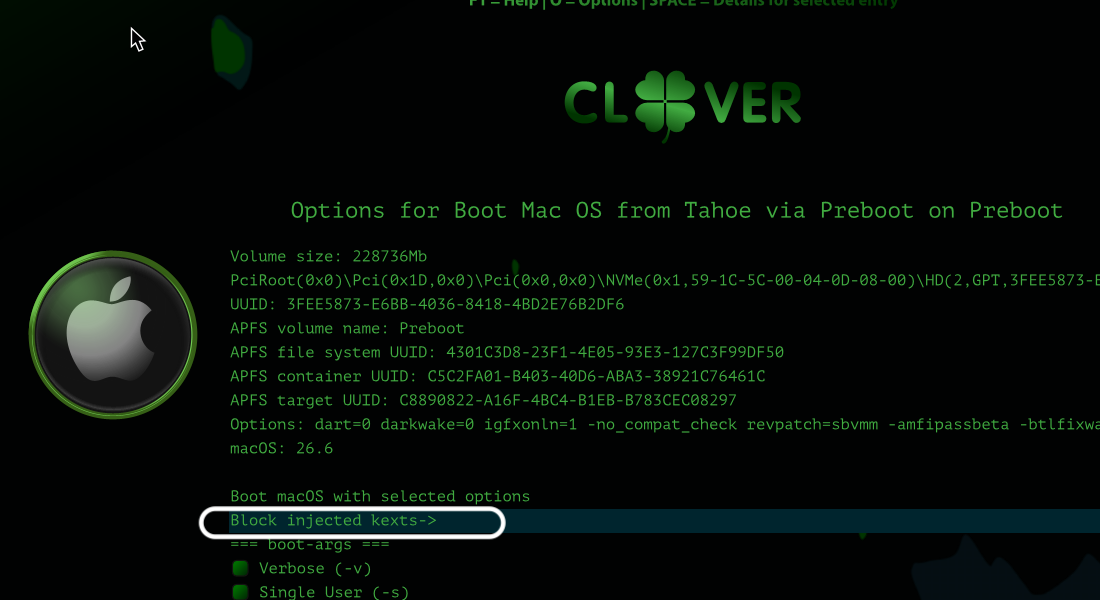
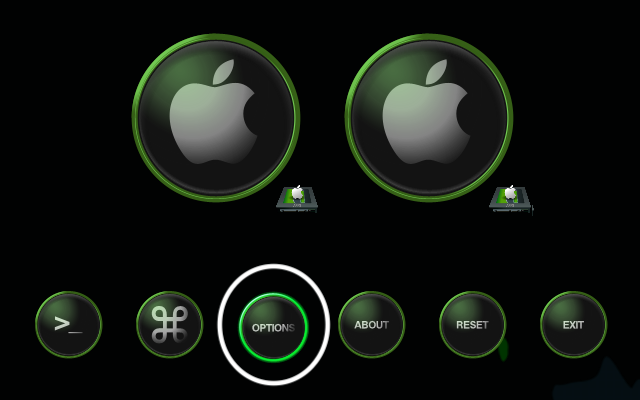
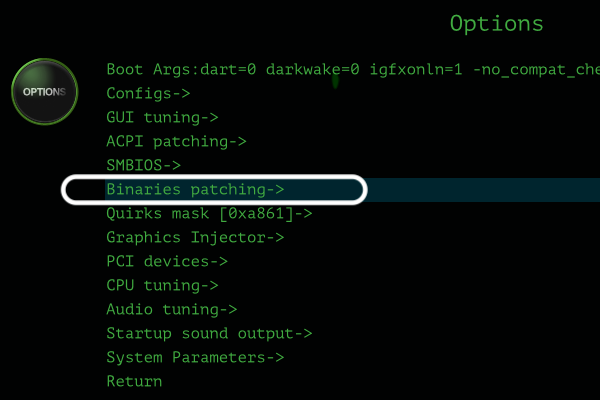
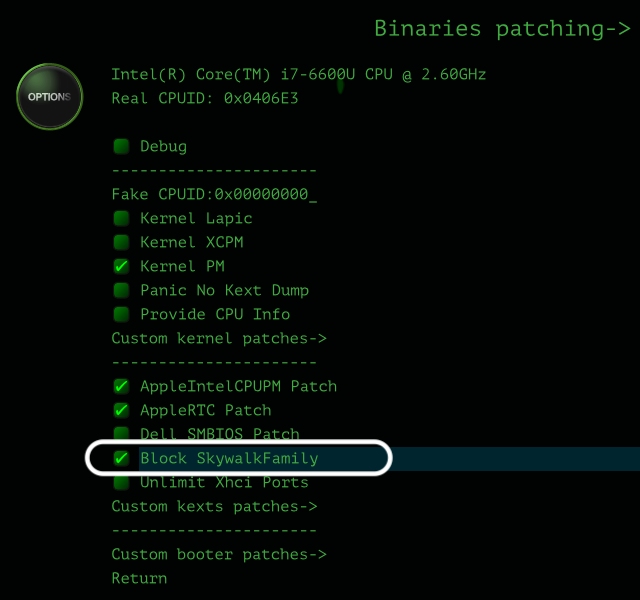
With a fresh installation, make sure to boot without these 3 elements: BlockSkywalk under Kernel & Kext patch: unselect at Clover boot menu->Options->Binary patching->... IO802FamilyLegacy kext: Clover boot menu->Sonoma->[SPACE]->Block injected kexts->Other->... IOSkywalkFamily kext: Clover boot menu->Sonoma->[SPACE]->Block injected kexts->Other->... Only allow these once Sonoma initial installation is complete and you've applied the OCLP Patcher legacy wireless patch; and only if you have a legacy Broadcom card of course! Below are illustrations re: actions to take from the Clover boot menu: 1) to unselect/uncheck BlockSkywalk binary patch: 2) to block kexts at startup and prevent their injection: I've updated my Sonoma guide to avoid the issue you've encountered and make it similar to what I had posted in my subsequent guides for Sequoia and Tahoe.
-
@Hervé I am trying fresh install Sonoma on external hard drive with Clover r5167 as attached EFI / following your guide however is looping . Please advise. Thank you E7270 SONOMA.zip
- Earlier
-

[Resolved] Bluetooth of Intel 8260NGW no longer works under Monterey
tryit replied to tryit's topic in Wireless & Bluetooth
Not sure why on the lastest Monterey 12.7.6 , make my BT Intel 8260NGW disable. So I add IntelBTPatcher.kext, IntelBluetoothFirmware.kext, BlueToolFixup.kext and update Lilu.kext to 1.72. Now works again. -
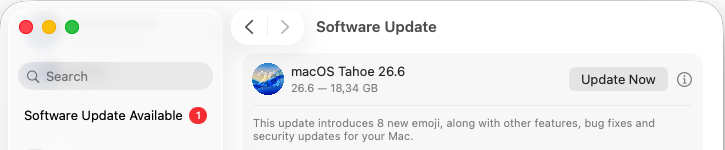 Released July 27th, 2026. Build 25G72. Bug fixes and security update. Safe to install on our Hackintosh platforms. Also released at the same time: macOS Sequoia Security Update 15.7.8 (Build 24G824) macOS Sonoma Security Update 14.8.8 (Build 23J620)
 -

[Resolved] Bluetooth of Intel 8260NGW no longer works under Monterey
Hervé replied to tryit's topic in Wireless & Bluetooth
Hi @tryit, I fear it's going to be much difficult to provide assistance without knowing if Bluetooth stopped working all of a sudden without you making any changes (in which case you could suspect a hardware failure) or after changes you made. In the latter case, only you can provide the necessary info. No EFI, no bootloader config file, ... I've not crystal ball you know... If you see the device in IOReg, it can only be your setup. -
@Herve, could you please advise? I'm still running the latest version of Monterey (12.7.6), and I've noticed that Bluetooth no longer works. The Bluetooth toggle can be turned on, but the status always shows Off. I'm not sure when this started because I rarely use Bluetooth. My Wi-Fi/Bluetooth card is an Intel 8260NGW. I tested it for more than four years, starting with the out-of-the-box Monterey installation following your E7270 guide (I don't remember which Monterey version). Both Wi-Fi and Bluetooth worked flawlessly . I do not remember if I changed and added kext or patched In System Report, I see the following: Bluetooth Controller: Address: NULL State: Off Chipset: BCM_4350C2 Discoverable: Off Firmware Version: v0 c0 Product ID: 0x0001 Supported services: 0x382039 < HFP AVRCP A2DP HID Braille AACP GATT Serial > Transport: UART I am trying boot with a fresh downloaded EFI , and have no luck too. Thank you
-
Released July 27th, 2026. Build 25G72. Bug fixes and security update. Safe to install on our Hackintosh platforms. Also released at the same time: macOS Sequoia Security Update 15.7.8 (Build 24G824) macOS Sonoma Security Update 14.8.8 (Build 23J620) View full article
-

help with Dell Precision 5820 tower for Sequoia,Opencore v1.0.7
01ttOly replied to 01ttOly's topic in Dell Desktops
thanks. 1.my set of kexts are almost the same as in the Github,I would remove one CPUTscSync.kext which isn't present in the Github. 2.after failing,I did try with the Github repo and install Ventura,to no avail either,that's why I suspect it's my new BIOS. 3.What hardware details that I need to upload? By far I assume that both my new Dell BIOS implementation and my current quirks setting is at fault,but no idea where to tweak. Waiting for your further help. -
help with Dell Precision 5820 tower for Sequoia,Opencore v1.0.7
Hervé replied to 01ttOly's topic in Dell Desktops
I would recommend a few things to begin with: startup with a minimum set of kexts as in the Github repo; you may add more once macOS boots up and you need more services/hardware supported. the Github repo does stipulates that the posted EFI only works with Ventura. Did you try to install Ventura with it? your set of quirks differs a lot from those enabled in the Github repo. I've not looked at your hardware in details but I would suspect that your current quirks settings is at fault here. -
help with Dell Precision 5820 tower for Sequoia,Opencore v1.0.7
01ttOly replied to 01ttOly's topic in Dell Desktops
@Hervé my deepest gratitude for your guaidance. I got the machine with bios 2.4.8 and updated to 2.50.1,offcial log mainly is security patches. The github's file are more than 8 months old,didn't mention it's BIOS verison. Sure I would suspect it's the BIOS, I tried github's ACPI files,then Dortania's guide's files,both failed,and decompiles the SSDTs,nothing seems wrong.But sure limited by my knowledge of ACPI,I should be wrong. Waiting for your help,thanks. ACPI_githubVentura.zip ACPI_Dortania.zip SSDTsViaSSDTtime.zip -
help with Dell Precision 5820 tower for Sequoia,Opencore v1.0.7
Hervé replied to 01ttOly's topic in Dell Desktops
hello, will have a look tonight. -
I'm at my wit's end. It's a Dell Precision 5820 tower, C422,Intel xeon w-2135, Intel u.2 P3600 nvme, 64GB reg ram,rx5500xt. No matter what I tried,it always freezes at EXITBS. Opencore V1.0.7 I have the latest BIOS V2.50.1,updated from V2.48. The common BIOS options sure is right. SATA:AHCI, CSM disabled, above 4g decoding enabled, Secure boot disabled,etc. Tried with platform macPro 7,1 and now iMac Pro 1,1. I even tried with the EFI from Github 5820 for Ventura, freezes at EXITBS too. Tried with all tweaks of config.plist, quirks options,etc with the help of AI.AI doesn't help too much.All AIs are actually learning from gurus like @Hervé @Jake Lo. Would you pls take a look into my config.plist.I need to make this dell running macOS Sequoia at the moment and Tahoe in the near future. thanks for anyone.have been struggling it for over 3 days. t5820-Log-pci-mem-map.zip config.zip SysReport.zip
-
For the who would experiment Bluetooth issues/crashes after wake, Mirone's BluetoolFixup kext v2.7.3 appears to fix the problem. Inject the kext and add -btlfixwakecrash boot parameter to your bootloader config. BlueToolFixup.kext.zip
-
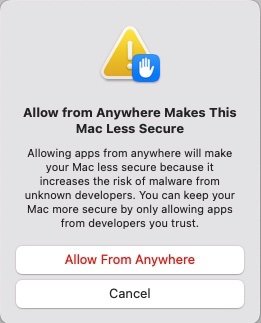
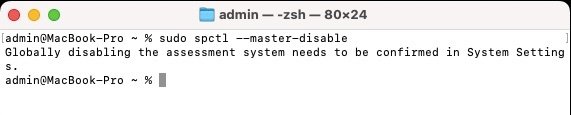
Following a recent query on the matter, I want to confirm that, whilst there was a time during which it was no longer possible to easily disable Gatekeeper in early versions of macOS Sequoia, the facility described above later returned and still applies to Sequoia and Tahoe. Example in Sequoia 15.7.7:
-
Hello @darnocs. As per our posted forum rules, distros never were supported at OSXLatitude so we're not going to start now... Look elsewhere if that's what you're after. The old and obsolete D620, whether with GM950 or nVidia NVS110M graphics, can natively run 2009 Snow Leopard and 2011 Lion, both in 32bit kernel mode. With the MLPF hack, they can run 2012 Mountain Lion in 32bit kernel mode. Today, all of these old OS X versions are totally obsolete and, unless you only use old software, you won't be able to do much with them; even basic Internet browsing will hardly be working due to compatibility issues with today's Web technology. All subsequent OS X versions up to El Capitan are 64bit only and therefore have no support for GMA950 or NVS110M graphics. macOS versions cannot be run since they require Penryn CPUs at minimum and the D620 is Merom only. See here and here for further details about compatibility. This being said, if you have a Mac or a Hackintosh at hand, you may create a myHack installer with a retail version of SL or Lion. Failing that, provided you have a retail copy of SL 10.6, 10.6.3 or 10.6.8 (DVD or USB key), you can use Nawcom's old ModCD tool to boot your D620 and install Snow Leopard. From there on, you may create a myHack installer for Lion or Mountain Lion. Full bootpacks for D620 are available here. Nawcom's ModCD is available here. A step-by-step installation method on a D430 is detailed here (just forget the old and defunct EDP part). myHack is available here. Lion and Mountain Lion can be downloaded directly from Apple's web site as posted here. Guides for MLPF'ed Mountain Lion installations are available here and here. We've got tons of old threads related to installing and running Snow Leopard/Lion/Mountain Lion on these old D Series laptops, just browse the forum and use the available Search facility.
-
I got an old D620 and wanted to Hackintosh it. I don't see any live links to .ISOs or such things. Any pointers?
-
Dell Precision 7530: success with macOS Sequoia
tranmylinh replied to cbushjr56's topic in Precision x000 Series
Hi @cbushjr56 Can you please share your EFI? Best regards, -
 RichardBN changed their profile photo
 -
 Released Sep. 15th, 2025. Version 26.0, build 25A354. Tahoe is the last version for Intel platforms and marks the end of the long road for Hackintosh computers as we've known it since 2006. It drops official support for all 8th gen. platforms + 9th gen. 2019 Coffee Lake MacBook Pro15,x and, somehow surprisingly, for 2020 Ice Lake-based MacBook Air9,1. This leaves final support for only a handful of 9th gen. and 10th gen. platforms. This being said, support for Kaby Lake graphics survives, all KBL kexts remaining present, so good news to all owners of Skylake laptops who will all be able to run Tahoe with full acceleration through the SKL graphics patch that's been available since Ventura. For other older iGPUs, patches should hopefully remain available through OCLP tool (once updated and released) to regain graphics acceleration. Officially supported Intel platforms are now limited to : 2020 iMac20,x (10th gen. Comet Lake) 2019/2020 MacBookPro16,x (9th gen. Coffee Lake and 10th gen. Ice Lake) 2019 MacPro7,1 (Cascade Lake) NB: macOS Ventura is now unsupported.
 -
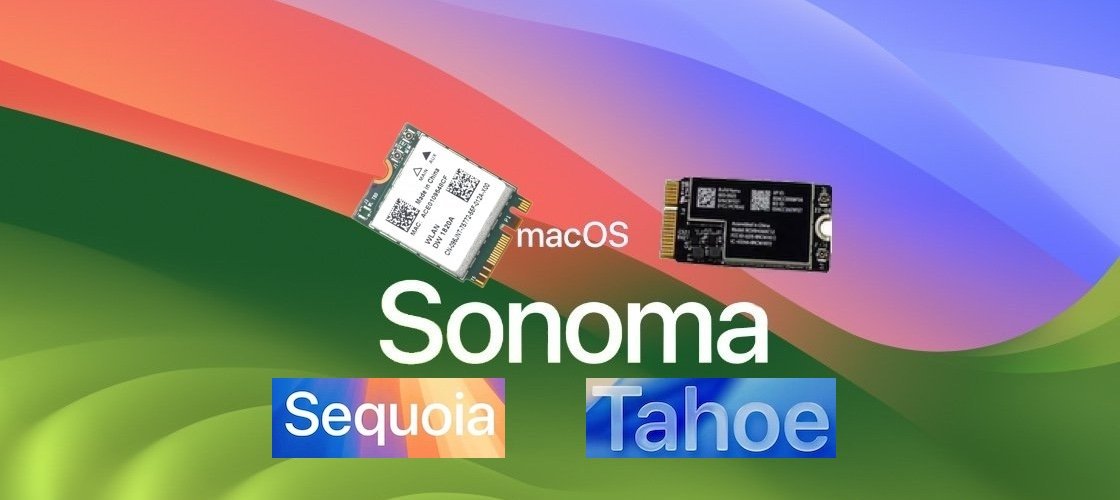 As stated when 1st beta was released and confirmed when it was officially released, Sonoma dropped support for Broadcom cards that were supported up to Ventura. A solution based on OpenCore bootloader and the OCLP Patcher has been available since mid-summer 2023. Nothing new on the matter as I post this article in January 2024, except that, good news for Clover users (yes, we still exist!), the solution now works with Clover too and is no longer limited to OpenCore. The issue for Clover users was that there was no readily available solution to block vanilla IOSkywalkFamily kext from being loaded at startup, even when trying to do this through patching the Info.plist file of the kext in the Clover config. No matter what, as long as the vanilla kext loaded/was cached, injecting the replacing kext would result in immediate Kernel Panic. This was finally resolved in Clover r5157 which integrates a kext patch in the form of a flag that can be enabled in the Clover config: BlockSkywalk (NB: it does not work with version r5155 or r5156). With this patch enabled, the abandoned IO80211FamilyLegacy from previous macOS version can be loaded/injected and so can the older/replacement version of the IOSkywalkFamily kext that is required. This being put in place, the OCLP patcher can then be used to apply the wireless root patch (whether Modern wireless or Legacy wireless) to finalise the Sonoma wireless fix. Broadcom cards that we all previously used up to Ventura, whether DW1560 (BCM5352 chipset), DW1820A (BCM4350 chipset) or Apple's own BCM94360xxx (BCM4360 and related chipsets) can now be used in macOS Sonoma exactly as they could in Ventura and earlier macOS versions. See our dedicated thread on the matter for full details.