


Hervé
-
Posts
10071 -
Joined
-
Last visited
-
Days Won
569
Content Type
Profiles
Articles, News and Tips
Forums
Posts posted by Hervé
-
-
Yes that may work but the easiest remains Windows Device Manager->Driver details where you'll find device's vendor id + device id.
-
@sensui20 SSDT table "SSDT-PLUG-DRTNIA" is corrupt. Make sure to replace it by a valid one. Other tables look Ok.
https://dortania.github.io/Getting-Started-With-ACPI/ssdt-platform.html#laptop
-
 1
1
-
-
Assuming there's no hardware-related issue with your keyboard, I guess the kext (driver) you're using may not be appropriate. It's probably I2C hardware but from which manufacturer? ALPS, Synaptics, Elan?
-
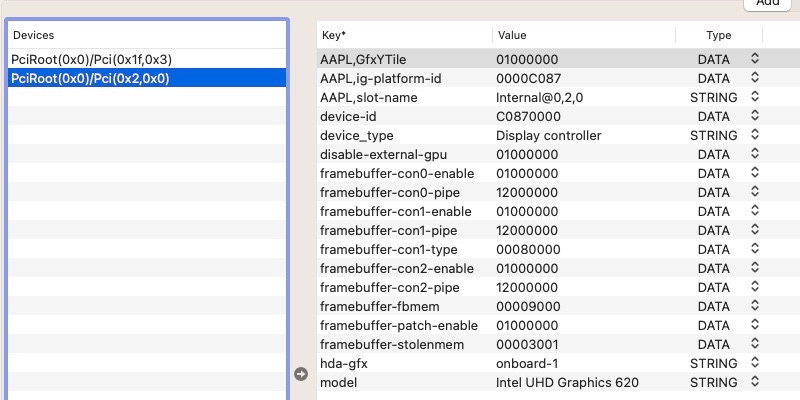
Graphics settings look a bit odd to me for a Kaby Lake U/Kaby Lake R laptop with HD 620/UHD 620 graphics (i.e. 7th or 8th gen)... For clarification, you should add your system's specs in signature or post them in your introductory post (we don't have crystal balls, sorry).

Never seen the need to change built-in LCD connector's pipe for instance.
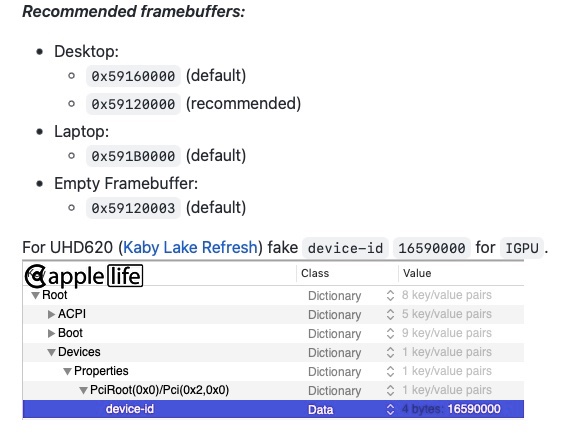
The recommend settings for an 8th gen Kaby Lake R laptop with UHD 620 graphics used to be:
- framebuffer layout 0x591b0000 (I used 0x59160000 for Mojave and 0x59160009 for Catalina on my 8th gen KBL R Latitude 7490), 0x87c00000 being for Amber Lake laptops (Dortania's documentation says otherwise but...)
- fake iGPU id 0x5916
See the WEG user manual.
Details of those KBL framebuffers are as follows:
ID: 87C00000, STOLEN: 34 MB, FBMEM: 0 bytes, VRAM: 1536 MB, Flags: 0x0000078B
TOTAL STOLEN: 35 MB, TOTAL CURSOR: 1 MB (1572864 bytes), MAX STOLEN: 103 MB, MAX OVERALL: 104 MB (109588480 bytes)
Model name: Intel HD Graphics KBL CRB
Camellia: CamelliaDisabled (0), Freq: 1388 Hz, FreqMax: 1388 Hz
Mobile: 1, PipeCount: 3, PortCount: 3, FBMemoryCount: 3
[0] busId: 0x00, pipe: 8, type: 0x00000002, flags: 0x00000098 - ConnectorLVDS
[1] busId: 0x05, pipe: 9, type: 0x00000400, flags: 0x00000187 - ConnectorDP
[2] busId: 0x04, pipe: 10, type: 0x00000400, flags: 0x00000187 - ConnectorDP
00000800 02000000 98000000
01050900 00040000 87010000
02040A00 00040000 87010000
ID: 591B0000, STOLEN: 38 MB, FBMEM: 21 MB, VRAM: 1536 MB, Flags: 0x0000130B TOTAL STOLEN: 39 MB, TOTAL CURSOR: 1 MB (1572864 bytes), MAX STOLEN: 136 MB, MAX OVERALL: 137 MB (144191488 bytes) Model name: Intel HD Graphics KBL CRB Camellia: CamelliaDisabled (0), Freq: 1388 Hz, FreqMax: 1388 Hz Mobile: 1, PipeCount: 3, PortCount: 3, FBMemoryCount: 3 [0] busId: 0x00, pipe: 8, type: 0x00000002, flags: 0x00000098 - ConnectorLVDS [2] busId: 0x04, pipe: 10, type: 0x00000800, flags: 0x00000187 - ConnectorHDMI [3] busId: 0x06, pipe: 10, type: 0x00000400, flags: 0x00000187 - ConnectorDP 00000800 02000000 98000000 02040A00 00080000 87010000 03060A00 00040000 87010000ID: 59160000, STOLEN: 34 MB, FBMEM: 0 bytes, VRAM: 1536 MB, Flags: 0x00000B0B TOTAL STOLEN: 35 MB, TOTAL CURSOR: 1 MB (1572864 bytes), MAX STOLEN: 103 MB, MAX OVERALL: 104 MB (109588480 bytes) Model name: Intel HD Graphics KBL CRB Camellia: CamelliaDisabled (0), Freq: 1388 Hz, FreqMax: 1388 Hz Mobile: 1, PipeCount: 3, PortCount: 3, FBMemoryCount: 3 [0] busId: 0x00, pipe: 8, type: 0x00000002, flags: 0x00000098 - ConnectorLVDS [1] busId: 0x05, pipe: 9, type: 0x00000400, flags: 0x00000187 - ConnectorDP [2] busId: 0x04, pipe: 10, type: 0x00000800, flags: 0x00000187 - ConnectorHDMI 00000800 02000000 98000000 01050900 00040000 87010000 02040A00 00080000 87010000ID: 59160009, STOLEN: 38 MB, FBMEM: 0 bytes, VRAM: 1536 MB, Flags: 0x00830B0A TOTAL STOLEN: 39 MB, TOTAL CURSOR: 1 MB (1572864 bytes), MAX STOLEN: 115 MB, MAX OVERALL: 116 MB (122171392 bytes) Model name: Intel HD Graphics KBL CRB Camellia: CamelliaV3 (3), Freq: 1388 Hz, FreqMax: 1388 Hz Mobile: 1, PipeCount: 3, PortCount: 3, FBMemoryCount: 3 [0] busId: 0x00, pipe: 8, type: 0x00000002, flags: 0x00000098 - ConnectorLVDS [1] busId: 0x05, pipe: 9, type: 0x00000400, flags: 0x000001C7 - ConnectorDP [2] busId: 0x04, pipe: 10, type: 0x00000400, flags: 0x000001C7 - ConnectorDP 00000800 02000000 98000000 01050900 00040000 C7010000 02040A00 00040000 C7010000It's worth noting that, on the 7490, HDMI output required connector con1 to be configured (i.e. patched) as follows:
01051200 00080000 87010000The patch therefore varies according to the FB used. I see no reason why things would be different on an 8th gen 7390.
-
 1
1
-
You use SKL framebuffer atout 0x19120000 which defines the following properties:
ID: 19120000, STOLEN: 34 MB, FBMEM: 21 MB, VRAM: 1536 MB, Flags: 0x0000110F
TOTAL STOLEN: 56 MB, TOTAL CURSOR: 1 MB (1572864 bytes), MAX STOLEN: 124 MB, MAX OVERALL: 125 MB (131608576 bytes)
Model name: Intel HD Graphics SKL CRB
Camellia: CamelliaDisabled (0), Freq: 1388 Hz, FreqMax: 1388 Hz
Mobile: 1, PipeCount: 3, PortCount: 3, FBMemoryCount: 3
[255] busId: 0x00, pipe: 0, type: 0x00000001, flags: 0x00000020 - ConnectorDummy
[1] busId: 0x05, pipe: 9, type: 0x00000400, flags: 0x00000187 - ConnectorDP
[2] busId: 0x04, pipe: 10, type: 0x00000400, flags: 0x00000187 - ConnectorDP
FF000000 01000000 20000000
01050900 00040000 87010000
02040A00 00040000 87010000
As suggested by Jake, once you've identified in IOReg which connector your HDMI output attaches to (in all likelihood con1, i.e.AppleIntelFramebuffer@1 but it may be con2, i.e AppleIntelFramebuffer@2), patch its type by adding the following lines to your injected iGPU properties set:
framebuffer-conX-enable    1           NUMBER
framebuffer-conX-type      00080000    DATA
where X is 1 or 2.
HDMI output can also be a little difficult at times on Skylake HD5x0. Make sure to add Whatevergreen boot arg igfxonln=1 in your bootloader config.
See the Whatevergren documentation and user manual.
-
HDMI audio only works on Haswell Hackintosh if:
- you patch the associated framebuffer connector to HDMI type (00080000) -> not the case in the last IOReg you posted but corrected in Jake's last config
- you rename ACPI device B0D3 device to HDAU -> that was the case in the last IOReg you posted
Make sure you select the HDMI audio output, it has to be done manually and volume is controlled on the HDMI device itself, not the laptop.
-
If you still have Windows, I'd also check it out in Device Manager...
But it does not look like the touchscreen of the XPS 12 9Q33 is USB-based but, in fact, connected to the I2C bus alongside the TouchPad. There's probably little chance to get it working under macOS...
-
I'm pretty sure you're mistaken here... What you've illustrated is an Intel sensor of some sort. I don't believe it's the touchscreen at all. Dell has been fitting Atmel touchscreens to their XPS and Latitude laptops for years.
-
Absolutely nothing with the IOHIDFamily kext, it's just a patch to be specified in the bootloader config. I have the same patch in the OpenCore pack I posted in my Vostro 200 guide if you want to double check the patch in OC. Make sure to reset NVRAM at OC Picker when you reboot.
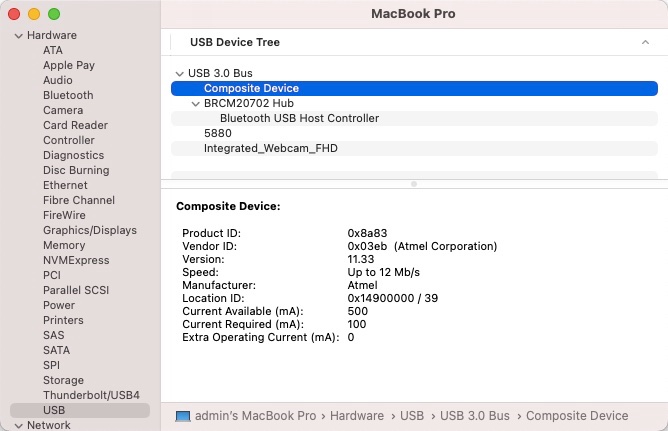
Again, this can only work if your touchscreen is USB-based. Do you see it in SysInfo->Hardware->USB? Would be something looking like this:
-
If the stuff I posted on p1 does not work or suffice, you may seek inspiration from here.
For graphics, an old Nvidia (Tesla) card would be a lot easier to get working. I don't know if the dGPU is MXM-based or soldered. If former, you may manage to replace your Radeon HD 3670 by an Nvidia Quadro FX 7xxM model (supported OOB up to High Sierra).
-
So...
- BIOS: F.20 (with AHCI support it would seem)
- CPU: Intel Penryn C2D P8400 FSB-1066 @2.26GHz
- RAM: 4GB DDR2-800 (PC2-6400)
- dGPU: ATI Mobility Radeon HD 3670 2GB (PCI id 1002:9593)
- Display: 1680x1050 built-in LCD
- Audio: Analog Devices AD1984A Codec
- IO Controller: Intel ICH9-M
- USB: USB2.0 ports
- Disk: 160GB Hitachi HTS543216L9A300 5400rpm SATA-II HDD
- LAN: Intel 82567LM Gigabit Ethernet
- Wireless: Intel Wifi Link 5300 AGN
- TouchPad: Synaptics
- SD card reader: Ricoh R/RL/5C476(II) (PCie)
- Optical drive: TSSTcorp TS-L633M CD/DVD writer
Should run macOS High Sierra pretty well, though it'll be slow on that SATA-II 5400rpm HDD which you should consider replacing by a SATA SSD.
I see the you've been posting on various forums these last few months to try and get macOS installed on this old laptop so I assume you're now familiar with bootloader, etc. I suggest that:
-
you use Clover and start with an older version installed as follows:
- Clover for UEFI booting only
- Install Clover in the ESP
-
UEFI Drivers
- AudioDxe
- DataHubDxe
- FSInject
- SMCHelper
- ApfsDriverLoader
- AptioMemoryFix
- Fat
- PartitionDxe
- Ps2MouseDxe
- UsbMouse.Dxe
- VBoxHfs
- Themes (optional)
- Install Clover Preference Pane (optional)
- you may use version r5035 for instance:
- once Clover is installed, run Clover Configurator app and mount the freshly created EFI partition of the USB installer
- open this EFI partition and transfer the files & folders from the Clover pack below to the EFI/Clover folder. The pack may not be100% complete to match all of your hardware (keep looking for kexts as required) but should get you going:
For audio, experiment with the various layout ids specified in the AppleALC wiki.
For your Synaptics touchpad, look here though it's old stuff (I've no experience with anything other than ALPS touchpads).
For your Intel Wireless card, look here.
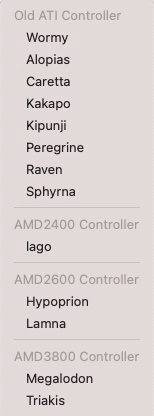
For graphics acceleration, you'll have to experiment with the various ATI framebuffer personalities that may apply to Mobility Radeon HD 3670 (I've no experience with this):
This is all without any guarantee of any kind so be prepared for additional home work. Good luck!
-
On 11/24/2022 at 9:06 PM, Hervé said:
[...] without your full systems specs (eg: audio codec, LAN card, wireless card, type of keyboard/touchpad, etc.), we won't be able to give you any working EFI [...]
-
You did reset NVRAM at OC Picker after you changed your config and rebooted, right?
I also note you never got rid of the stolenmem patch...
-
Touchscreens usually are USB based. However, recent macOS versions require that you apply a patch (called "USB HID fix") to support those USB accessories because, since Big Sur, Apple dropped support for older/legacy USB technology. The patch is readily available on Hackintosh forums and provided in my E7270 guide. Look it up.
-
I'm very pessimistic about likely success of graphics acceleration in Big Sur for R7 240. There were many many posts at IM on the matter with zero success afaik. Does not appear to be supported beyond Mojave with which it already required patching.
-
Ok, good to know. Thanks for posting the solution you found through experimentation.
Azul FB in question is natively defined as follows:
ID: 0A260005, STOLEN: 32 MB, FBMEM: 19 MB, VRAM: 1536 MB, Flags: 0x0000000F
TOTAL STOLEN: 52 MB, TOTAL CURSOR: 1 MB (1572864 bytes), MAX STOLEN: 116 MB, MAX OVERALL: 117 MB (123219968 bytes)
Camellia: CamelliaDisabled (0), Freq: 2777 Hz, FreqMax: 2777 Hz
Mobile: 1, PipeCount: 3, PortCount: 3, FBMemoryCount: 3
[0] busId: 0x00, pipe: 8, type: 0x00000002, flags: 0x00000030 - ConnectorLVDS
[1] busId: 0x05, pipe: 9, type: 0x00000400, flags: 0x00000087 - ConnectorDP
[2] busId: 0x04, pipe: 9, type: 0x00000400, flags: 0x00000087 - ConnectorDP
00000800 02000000 30000000
01050900 00040000 87000000
02040900 00040000 87000000
Compared to the other 2 you tried:
ID: 0A260006, STOLEN: 32 MB, FBMEM: 19 MB, VRAM: 1536 MB, Flags: 0x0000000F
TOTAL STOLEN: 52 MB, TOTAL CURSOR: 1 MB (1572864 bytes), MAX STOLEN: 116 MB, MAX OVERALL: 117 MB (123219968 bytes)
Camellia: CamelliaDisabled (0), Freq: 2777 Hz, FreqMax: 2777 Hz
Mobile: 1, PipeCount: 3, PortCount: 3, FBMemoryCount: 3
[0] busId: 0x00, pipe: 8, type: 0x00000002, flags: 0x00000030 - ConnectorLVDS
[1] busId: 0x05, pipe: 9, type: 0x00000400, flags: 0x00000087 - ConnectorDP
[2] busId: 0x04, pipe: 9, type: 0x00000400, flags: 0x00000087 - ConnectorDP
00000800 02000000 30000000
01050900 00040000 87000000
02040900 00040000 87000000
ID: 0D260007, STOLEN: 64 MB, FBMEM: 34 MB, VRAM: 1536 MB, Flags: 0x0000031E TOTAL STOLEN: 99 MB, TOTAL CURSOR: 1 MB (1572864 bytes), MAX STOLEN: 227 MB, MAX OVERALL: 228 MB (239616000 bytes) Camellia: CamelliaDisabled (0), Freq: 1953 Hz, FreqMax: 1953 Hz Mobile: 1, PipeCount: 3, PortCount: 4, FBMemoryCount: 3 [0] busId: 0x00, pipe: 8, type: 0x00000002, flags: 0x00000030 - ConnectorLVDS [1] busId: 0x05, pipe: 11, type: 0x00000400, flags: 0x00000107 - ConnectorDP [2] busId: 0x04, pipe: 11, type: 0x00000400, flags: 0x00000107 - ConnectorDP [3] busId: 0x06, pipe: 3, type: 0x00000800, flags: 0x00000006 - ConnectorHDMI 00000800 02000000 30000000 01050B00 00040000 07010000 02040B00 00040000 07010000 03060300 00080000 06000000Go figure it out!
-
You can look at the guides I've posted for old Penryn-based Dell Latitude D630 and/or D830 in the Guides section (obviously). They're specific to those Dell and without your full systems specs (eg: audio codec, LAN card, wireless card, type of keyboard/touchpad, etc.), we won't be able to give you any working EFI, but you'll get pointers out of those guides.
Target macOS High Sierra 10.13, that's the last version to officially support (and to the full) your hardware platform.
-
You're using Azul framebuffer 0x0d260007 instead of the expected 0x0a260006 which is what works on 4th gen Haswell Hackintosh laptops. Try and change your injected property from this:
to this:
AAPL,ig-platform-id 0600260a DATAand add this:
framebuffer-patch-enable 1 NUMBER framebuffer-portcount 4 NUMBER -
Clover probably better suited for legacy C2D platforms with non-UEFI BIOS.
-
I invite you to experiment with a bootable USB key on which you'll install your current bootloader setup with a modified config file where you'd remove all those connector's patches, i.e. all those framebuffer-conX-YYYY lines.
-
If VGA does not work OOB, don't expect it to work at all; saying that you have to make it work won't make it work... macOS just has no official support for VGA output off iGPUs anymore. There's no known patch to that effect so there you go.
Video patches for 4th gen Haswell graphics is of no use to you and your CFL UHD 630 iGPU. According to the Dortania documentation, AMD R7 240 remains supported up to Monterey but success rate varies according to make and models (you'll have to make some extensive reading and experimenting):
https://dortania.github.io/GPU-Buyers-Guide/modern-gpus/amd-gpu.html#r7-r9
Apart from repairing your HDMI port or getting graphics acceleration working out of your R7 240, the only option you have is installing a supported discrete graphics card. You can get nVidia Kepler cards for next to nothing and these remain fully and natively supported in Big Sur (eg: GeForce GT710/720/730).
-
-
No such thing as "clear PRAM" on a Hackintosh; that's for real Mac computers only.
You can of course re-install Mavericks (or any subsequent compatible OS X/macOS version) over an existing build.
-
-> ALC688 codec. Use AppleALC PlugIn of Lilu and configure according to the AppleALC wiki.
Same as you had with Monterey really; provided you did not install any OCLP patch for audio; that would be unsuitable.
Dell XPS 12 9q33: need help to install macOS Ventura
in Other Dell laptops
Posted
Not sure I see the relevance of that Ubuntu-related video for macOS (and it's in Italian!) but where did you get that kext from? Didn't it come with instructions and/or proven usage? If it's the stuff posted on GitHub by Coolstar, that's old preliminary work dating back 2018 that comes with zero documentation and never revisited or updated since initial commit. Maybe you should start by contacting the author but I'm pretty sure it's some very unfinished work...
All I can say is, yes, you'll definitely need a driver, i.e. a kext, for this I2C Touchscreen to be supported.