



Hervé
-
Posts
10071 -
Joined
-
Last visited
-
Days Won
569
Content Type
Profiles
Articles, News and Tips
Forums
Posts posted by Hervé
-
-
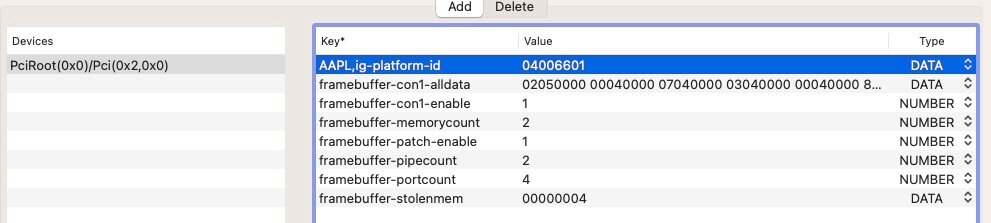
The properties you inject for your iGPU are all correct

but you forgot to patch fbmem to reduce it to 8MB. Add the following property:
framebuffer-fbmem 00008000 DATASee: https://osxlatitude.com/forums/topic/2945-guide-for-enabling-vga-dvi-dp-and-hdmi-in-intel-hd4000-gpu
And, of course, don't use the patched DSDT of a Latitude E6230 on your E5430.
-
@victorsina whilst testing various layout ids through boot arg -alcid=xxx boot parameter is fine, you forgot that the audio layout id was actually injected through Device Properties section against audio device @1F,3:
As such, I would recommend you comment out that property injection by adding a "#" character in front of layout-id. This way, only the boot arg will take effect.
-
See the Bible thread on the matter at insanelymac.com, especially p84. If your LCD screen's connector is eDP, just forget about it, your laptop is not suitable.
-
And why use a patched ACPI table for a 6th/7th gen 7280 on an 8th gen 7490? You need to sort out your EFI and use adequate settings, including all relevant patched ACPI tables + relevant kets.
-
Good, don't hesitate to post your own bootloader EFI then.
-
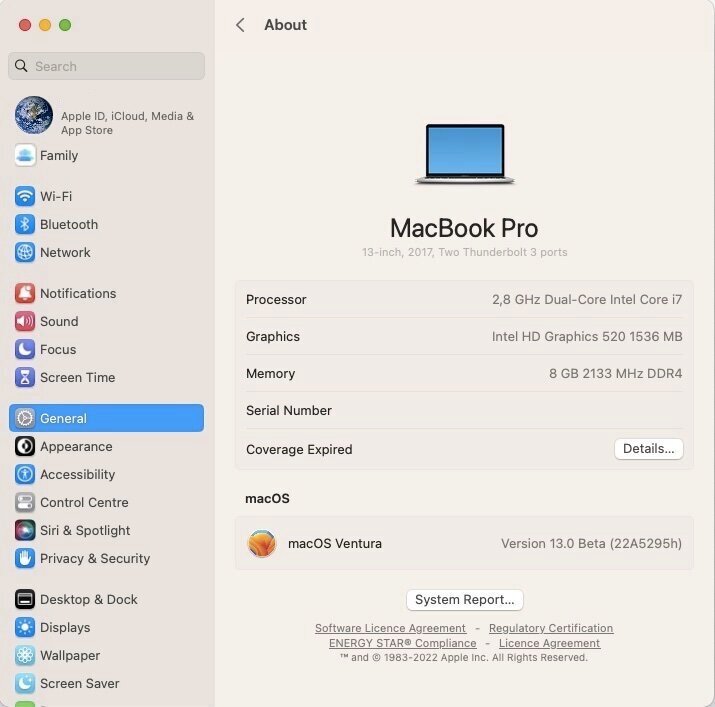
Look up the settings I've posted for my Skylake/HD520 Latitude E7270. Graphics settings to use will be 100% identical: KBL framebuffer layout + fake id and MBP14,1 SMBIOS.
-
 2
2
-
-
Nope but all you need to do is grab one from an existing guide or thread (like Monterey related), then update Clover/OC/kexts to latest versions. Rest is unchanged.
-
1
-
-
It's no different that the EFI for beta 1. But it's water under the bridge with beta 3 and 1st public beta being out now. Just make sure to use OC 0.8.3 or Clover r5148 and latest versions of add-on kexts (Lilu & PlugIns most of all).
-
Incremental update for 1st public beta. Build 22A5295i.
I'm running Clover r5148 and found I needed to clear NVRAM (done through macOS Recovery) to update from 95h to 95i successfully. Until I did that, I was getting a boot loop when booting the temp "Install Ventura from..." partition.
Spoiler
-
Ok on my Skylake/HD520 Latitude E7270. With Lilu v1.6.2, the SkylakeInjector kext that was previously published must be removed or system will hang at boot.
Spoiler
-
E7270_Clover_r5148_13.0.b3.zip - E7270_Clover_r5148_13.0.b3_v2.zip
Edit:
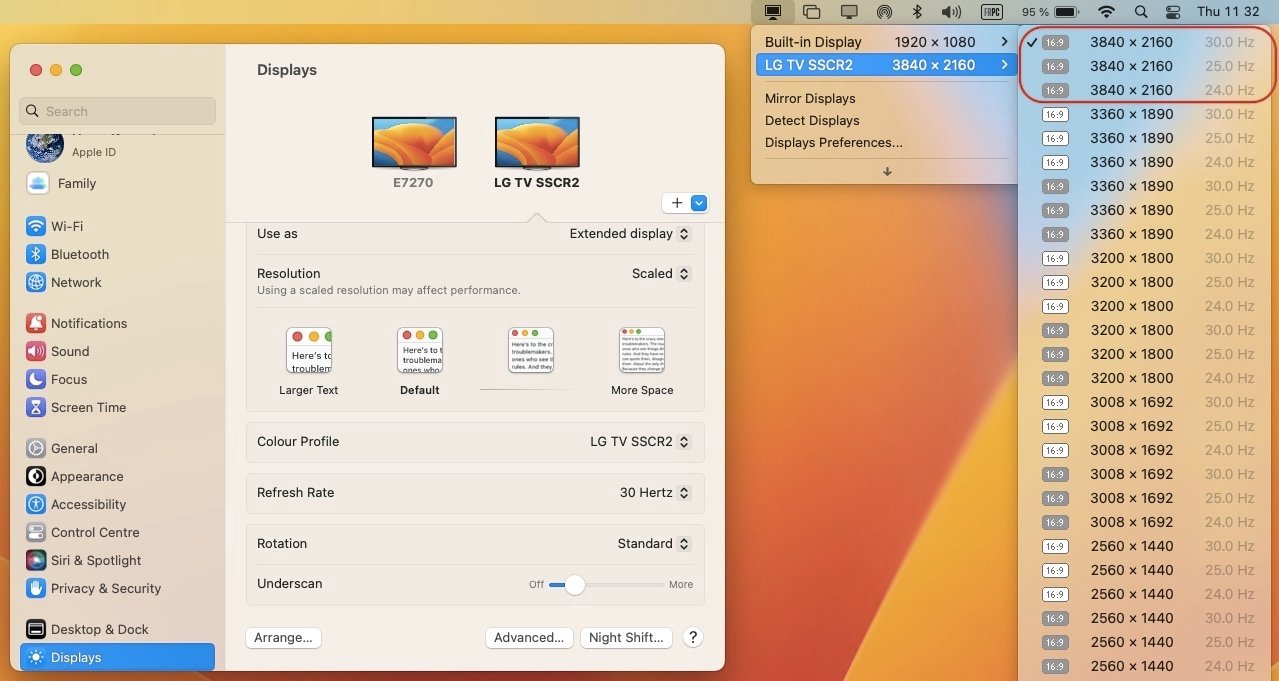
Revised pack v2 with KBL framebuffer changed to 0x59160000 and KBL fake id changed to 0x5916 to fix lack of HDMI output.
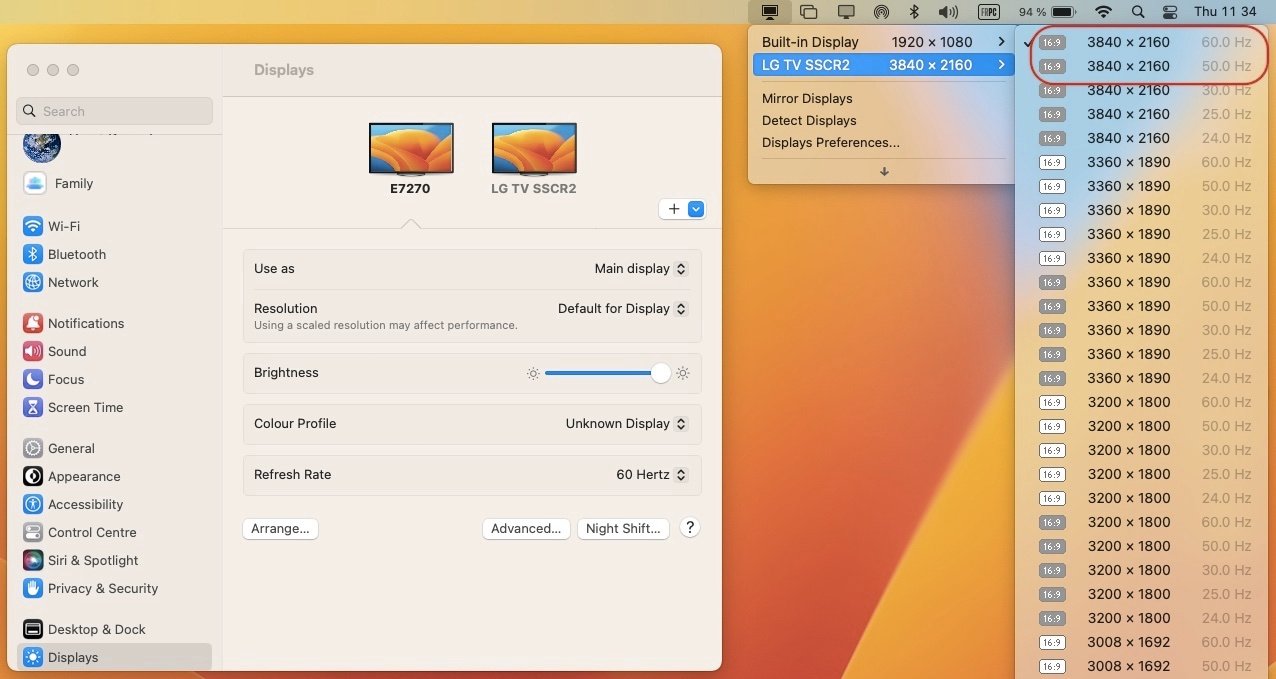
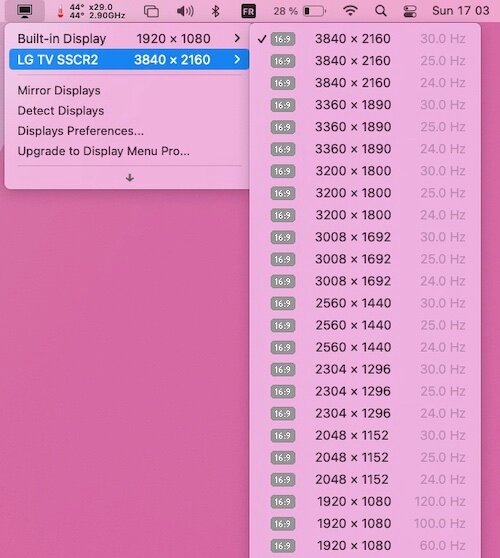
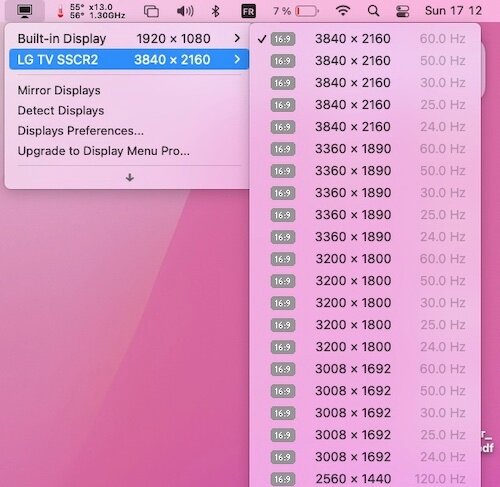
This fully supports 4K @24-30Hz out of HDMI and 4K @60Hz out of mDP:
Spoiler
Details about differences between KBL mobile framebuffers 0x56160000 ad 0x591B0000 and patching requirements are available here.
-
1
-
-
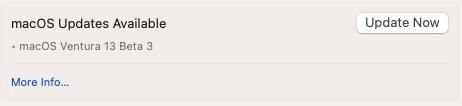
Released July 6th, 2022.
Build 22A5295h.
Requires Lilu v1.6.2 and Clover r5148 or OpenCore v0.8.3. With Clover, it's imperative to update to r5148 and reboot with r5148 before updating to beta 3 otherwise Ventura update will fail.
-
11 hours ago, Akerbeltz14 said:
@Baio77 there is no lilu V. 1.6.2 on releases.
You just need to know where to look...
-
After double checking my Skylake/HD520 Latitude E7270, with DVMT patched to 64MB or 96MB through GrubShell, I'm getting 4K @30Hz max. HDMI and 4K @60Hz DP:
It's in full compliance with Intel's posted specifications.
-
On any given machine, macOS may prompt you to re-enter your Apple ID details if you switch SMBIOS parameters and have different values. This is typical of running multiple macOS partitions with multiple versions that use individually do not use the same setup.
If this does not apply to your Hackintosh, you may not have NVRAM fully operational, in which case you must make the necessary adjustments to your OC config. See the Dortania guidance for details.
-
ACPI arrangements of the Lenovo E470 are irrelevant and do not concern your specific model, which is different.
DSDT patch or device properties injection all make up for the same goal in the end; they're just different ways to achieve the same thing.
Why the well-known SD card reader patch won't work for you is something that eludes me totally. Maybe something obvious we've all missed!
-
Here are Intel's specs:
Do you use Display Menu app to select your HDMI resolution?
-
See at bottom of post #1:
If you have, say, a Clover bootable USB key, simply copy the ModGRUBShell.efi module to EFI/CLOVER/drivers/UEFI folder.
I would expect you to find DVMT set to 64MB and require to set it to 96MB for 4K @60Hz.
-
Hi @skyrilhd
Finally got round to test your kext on my Latitude E7270 fitted with Alps V8 touchpad (touchscreen model):
-
v2.2.9 Debug (1500)
- Default touchpad speed is a little quicker than with my previous PS2 controller kext but it suits me just fine and it remains fully adjustable through the PrefPane of course.
- Muti-finger gestures is working fine too (eg: Notification Centre, LaunchPad, etc.). 3-finger gestures can be a little difficult but that's due to the small size of the touchpad.
- Keyboard 100% operational.
- Looking very good to me.
-
v2.2.9 Debug (6000)
- TouchPad not working at all.
- keyboard 100% Ok.
This is the best Alps driver I ever got to experiment with on all my Latitude laptops. Respect!

-
v2.2.9 Debug (1500)
-
Try this:
- replace your SSDT-SDCard by this one and reboot: SSDT-SDCard.aml.zip
- if that does not bring your card reader to life, try this OC config (reset NVRAM at reboot): 0628configOC0.81.plist.zip
-
The last OC EFI folder you posted shows that you disabled patches for framebuffer's fbmem and stolenmem; I therefore assume you must have patched DVMT in BIOS through Grubshell. Is that correct and if so, which value did you set DVMT to? 64MB or 96MB?
I would also try to disable these other patches:
- disable-agdc
- enable-hdmi-dividers-fix
I'm not using such patches on my SKL HD520 Latitude E7270 and obtain 4K @60Hz out of DP + HDMI with DVMT 96MB BIOS patch alone (I only use igfxonln=1 boot-arg to avoid built-in LCD staying off when connecting HDMI).
-
The only patch you require for HDMI output is the connector type; absolutely no need to patch connector's pipe or flags.
You have 2 x very incorrect property injections in your config:
framebuffer-con1-enable     1000000    NUMBER
framebuffer-patch-enable    1000000    NUMBER
Correct statements are:
framebuffer-con1-enable     1    NUMBER
framebuffer-patch-enable    1    NUMBER
or this, if you want to inject the properties in DATA type:
framebuffer-con1-enable     01000000    DATA
framebuffer-patch-enable    01000000    DATA
You've mixed things up.
You also confused Opencore EFI folder with module opencore.efi. Former is what one usually posts (in zipped version), latter is of no use at all for debugging.
-
@Baio77 You may mean well, but please keep this thread on-topic and do not divert onto fixing what you believe to be issues when such things were not even mentioned and your proposed new setups end up creating new issues. It's a recurring pattern of yours... The OC EFI you provided does not even address the O2 SD card reader, the thread's own topic!
@George1203 The OC config you posted shows incorrect injections:
In addition, these injections useless if you already use a patched SSDT to do so (SSDT-SDCard.aml). So only use one solution or the other but not both. In your case, SSDT-SDCard is correct, your OC config is wrong.
As advised by Jake, make sure you also remove those add-on kexts that appear in your OC config (remove them from the OC config and the kexts folder):
- AppleSDSX
- AppleSDXCInjector
- VoodooSDHC
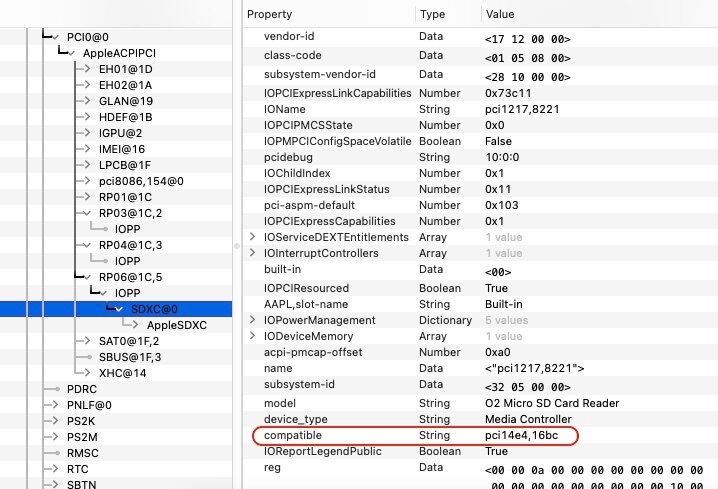
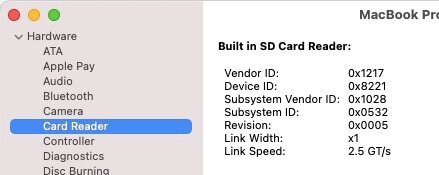
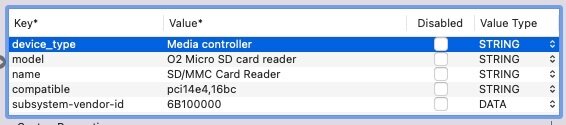
As stated here (based on posted reports by forum members), the patch is understood to be applicable to your O2 card reader model (ven/dev id 1217:8621) so all that's required is injecting the property declaring compatibility with Apple's hardware (pci14e4,16bc):
You would then expect to see your SD card reader in SysInfo in a manner similar to this:
Of course, make sure it's not disabled in BIOS.
As detailed here back in 2019, the same O2 SD card reader (pci1217,8621) was said to be fully working in a Lenovo ThinkPad E470 with the stated patch (compatible pci14e4,16bc). One notable difference though: the subsystem-vendor-id being set to Apple's 0x106B:
Jake already fixed all this in the OC config he provided where he commented out your incorrect config for the SD crd reader and added the correct properties injection.
-
Make sure you install Clover with the options provided in my E7270 guide. Refer to the last one for Monterey.
-
Maybe you're not using the correct Clover version or you did not install it properly/with the correct settings.

.jpg.70e00dd3b71f76a1040a09db9dec55c6.jpg)

Latitude 7490: boot loop with Ventura beta installer
in The Archive
Posted
Wireless card specs?