
Hervé
-
Posts
10093 -
Joined
-
Last visited
-
Days Won
569
Content Type
Profiles
Articles, News and Tips
Forums
Everything posted by Hervé
-

Dell Precision 7910 + VMware Workstation Pro 12 + Mac OSX 10.9
Hervé replied to rowee24's topic in The Archive
You have landed on this Hackintosh forum so I take it you're aware of what a Hackintosh is, aren't you? Can you confirm your Precision model as the high-end Tower 7910 workstation (no 9710 as far as I can see)? Post your detailed hardware specs (chipset, LAN, Audio, graphics card) so that we get a better idea re: potential as a Hackintosh. -
Dell Precision 7910 + VMware Workstation Pro 12 + Mac OSX 10.9
Hervé replied to rowee24's topic in The Archive
I would not expect everything to run on a VM, especially tricky apps such as iMessages that rely on real hardware elements (serial numbers, Ethernet interface, etc) and for which Apple introduced locking mechanisms some time ago. Why not opt for a proper Hackintosh installation instead? -
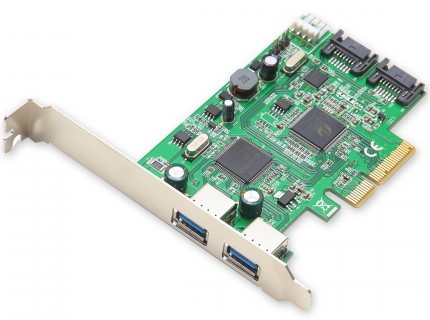
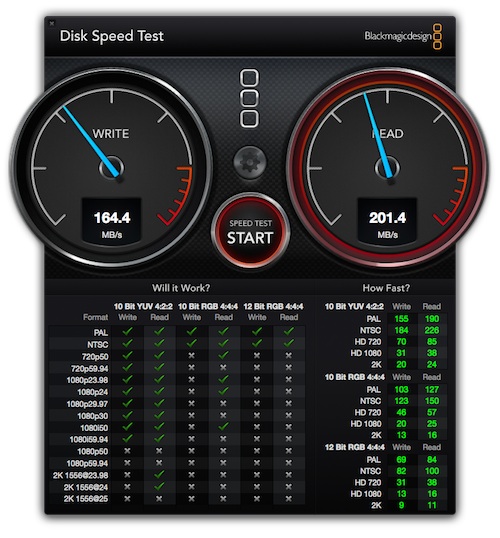
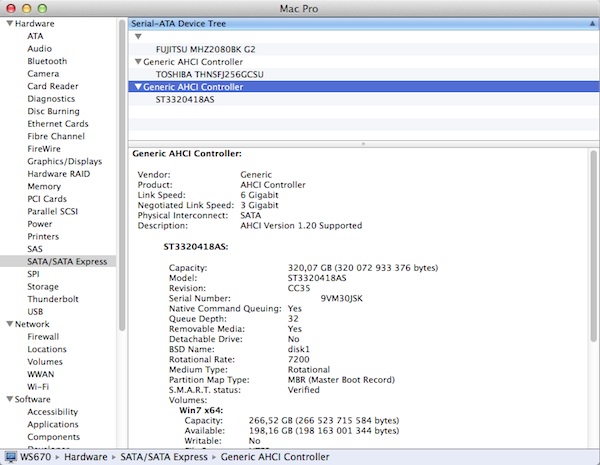
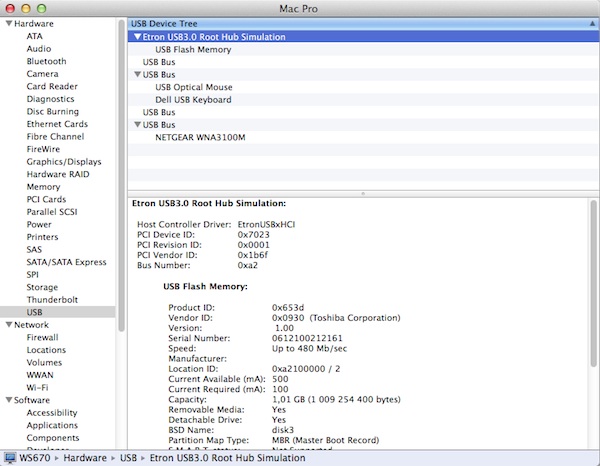
Following up on my experiments with the PCIe x1 Marvell 88SE9123 controller, I tested the Syba SD-PEX50055 card (which has also been mentioned on other forums). It offers 2 x SATA-III ports + 2 x USB3.0 ports on a PCIe 2.0 x4 card. The card is based on the ASMedia ASM1062 SATA-III controller and the Etron EJ168A USB3.0 controller. The SATA-III controller works OOB in Snow Leopard, Lion, Mountain Lion, Mavericks and Yosemite. It just requires power (using a floppy-type connector). By default, it's listed as "Unknown AHCI controller" under SL and as "Generic AHCI controller" in more recent OS X versions such as Mavericks or Yosemite, which can easily be fixed through a little patch of AppleAHCIPort kext. Just insert the card in a supporting PCIe slot (x4, x8 or x16) and attach the disk(s). Perfect for older desktop PCs that do not have a SATA-II/SATA-III/AHCI capable controller and wish to enjoy SATA HDDs or SSDs at PCIe speed and, for SSDs, enable Trim. USB ports only operate as USB2 speed when the card is fitted in a PCIe v1.0 slot. In addition, they are not supported in SL 10.6, only from Lion 10.7. http://www.sybausa.com/index.php?route=product/product&path=64_77_85&product_id=177 WS670:~ admin$ lspci -nn pcilib: 0000:08:00.0 64-bit device address ignored. [...] 04:00.0 PCI bridge [0604]: Pericom Semiconductor Unknown device [12d8:2304] (rev 05) 05:01.0 PCI bridge [0604]: Pericom Semiconductor Unknown device [12d8:2304] (rev 05) 05:02.0 PCI bridge [0604]: Pericom Semiconductor Unknown device [12d8:2304] (rev 05) 06:00.0 SATA controller [0106]: ASMedia Technology Inc. ASM1062 Serial ATA Controller [1b21:0612] (rev 01) 07:00.0 USB controller [0c03]: Etron Technology, Inc. EJ168 USB 3.0 Host Controller [1b6f:7023] (rev 01) [...] WS670:~ admin$ ` Although coming on a x4 format, the card is actually PCIe x2 (i.e. limited to 2 x PCIe lanes). Still, I was holding high hopes of being able to gain improved performance at full or near-full SATA-III (600MB/s) speed off my SSD in my ancient PCIe 1.0 workstation. Unfortunately it proved not to be the case. The card only seems to operate at 1 x PCIe lane per SATA port in my PCIe v1.0 x8 slot (operating at x4). BlackMagic speed test gave somehow disappointing results with a read speed of 200MB/s and a write speed of 166MB/s, i.e. it's a little slower reading than the Marvell controller but a little quicker writing.

-
https://osxlatitude.com/index.php?/topic/2513-i-must-be-dumber-than-a-mule/?hl=%2Bmodcd+%2Bd630&do=findComment&comment=18890 https://osxlatitude.com/index.php?/topic/2897-someone-please-direct-me-to-an-appropriate-guide/?hl=%2Bmodcd+%2Bd630&do=findComment&comment=22207 Old stuff of course, but generally 95% still applicable. I highly recommend that you skip the EDP part and use the full packs I provided instead. But it's up to you of course...
-
HDMI audio if you have HDMI.
-
Try the attached 10.11.3 AppleHDA kext (v272.51.3) patched for IDT 92HD71 (you'll have to remove VoodooHDA + AppleHDADisabler kexts). You may need to add EAPDFix + CodecCommander in order to gain jack/headphone output and audio after sleep (but check without 1st). If audio works with patched AppleHDA, try re-instating SpeedStep in BIOS too. AppleHDA_IDT692HD71.kext.zip EAPDFix.kext.zip CodecCommander.kext.zip
-
No brightness FN keys and no touch pad scroll maverick's
Hervé replied to SeanOMik's topic in The Archive
Don't know, that may depend on the trackpad/PS2 controller you're using. Did you also check if the parameter was enabled in the trackPad PrefPane? -
Or install the lspci binaries available in myHack... No info in BIOS at all?
-
What's the audio chip or codec on the E6500? It may show in the BIOS information page, if not, a lspci -nn Terminal command or DCPIManager will list the hardware ids. Once you've identified it, you may easily patch the AppleHDA kext.
-
No brightness FN keys and no touch pad scroll maverick's
Hervé replied to SeanOMik's topic in The Archive
Fn-UP/Fn-Down on the D630 throughout. No reason for this to be different on the D830, unless the DSDT was modified to that effect... -
Only compressed files can be attached. kext-dev-mode and rootless are defunct/useless boot parameters with ElCapitan. You have to use the CsrActiveConfig parameter to disable SIP or none of your add-on kexts will load...
-
Then install SL with ModCD... Look it up on the forum or the web.
-
laptop screen not properly recognised, no brightness control.
Hervé replied to dikkiedirk's topic in The Archive
The patch code would go into a DSM method within your Device (DGFX) section. You'll find hundreds of sample nVidia DSDT patches on the web. You'll find one such sample here for instance. -
Can't do much if you're not able to read what's written...
-
To gain DVI output in addition to HDMI (no VGA support), apply the Azul Framebuffer patch detailed here.
-
Since audio appears to be working with ALC269-patched AppleHDA, you may want to try adding EAPDFix + CodecCommander kexts to your system to gain headphone/jack output, including after wake.
-
Trouble booting Yosemite Installer on Thinkpad X201
Hervé replied to gpetrowich's topic in The Archive
Are you sure you removed the IntelHD graphics kexts and cache as indicated in the guide? I'm not entirely sure as I'm seeing AGPM loading for Intel HD 8086:0046 on your screenshot... See post #53 and #56 of that thread. -
You boot off the USB driver right after Yosemite installation on your HDD/SSD because, at that initial stage, the bootloader is not installed on the disk/partition. Once it's installed, you no longer require to boot via the USB key.
-
EDP->Documentation...
-
No, why? https://osxlatitude.com/index.php?/topic/2120-inventory-of-unsupported-and-supported-wireless-cards/
-
The D630 is a better machine (GM965 chipset vs. GM945, Merom/Penryn CPUs @FSB800 vs. Merom @FSB667, GMA X3100 vs. GMA950), but all Intel GMA chips of that era are only supported in 32bit kernel mode, i.e. up to Lion 10.7.5. It does not matter that CPUs are 64bit capable (other than being a requirement for Lion), there's no graphics support for those systems in 64bit mode.
-
Guys, please use the Search facility! https://osxlatitude.com/index.php?/topic/8721-10113-update-is-out/
-
Sorry, my mistake. Intel Crestline = GMA X3100 so you're limited to good old Snow Leopard and/or Lion in 32bit kernel mode. Or ML with MLPF hack, but it's a little buggy and cumbersome to deploy. It's probably best to stick to the vanilla SL or Lion installations. Follow the myHack procedure as documented in the EDP pages available from the EDP menu at the very top of your screen. Use the packs available at the link I posted above.
-
laptop screen not properly recognised, no brightness control.
Hervé replied to dikkiedirk's topic in The Archive
As far as I know, it won't change anything but go ahead and experiment. Best way to learn! -
laptop screen not properly recognised, no brightness control.
Hervé replied to dikkiedirk's topic in The Archive
I simply moved the PNLF device within the device PEGP.DGFX (for discrete GPU, i.e. the nVidia K1000M), but that may not work. In this attached 2nd patch, I've added connector type 0x0200000 to 1st NVDA port, the one used for the LCD display, to try and declare it as such. Again, no guarantee. DSDT_02.aml.zip