
Hervé
-
Posts
10099 -
Joined
-
Last visited
-
Days Won
569
Content Type
Profiles
Articles, News and Tips
Forums
Everything posted by Hervé
-
@PippoX0, if you read the thread more carefully, you'd see that mrdr indicated several times that he can only get to desktop with nv_disable=1; so let's not (re)state the obvious here. But I'm sure your DSDT patching suggestions will be highly appreciated by mrdr. I trust you did not just paste the EDID info "as is", i.e. with all the comma characters (","). It needs to be injected as a unique chain of contiguous bytes without anything else...
-
Can't see anything obvious that'd be wrong. Make sure you've not installed NullCPUPowerManagement or something like that. Install HWMonitor app to monitor CPU SpeedStepping and Turbo boost.
-
You may want to try the FakeSMC tuning: https://osxlatitude.com/index.php?/topic/2673-performance-tuning-with-fakesmc/ But try to monitor your CPU SpeedStep through HWMonitor 1st and see what it does. Install the HWMonitor version that came with the version of FakeSMC you installed.
-
No Sleep with NullCPUPowerManagement... That's a very basic rule. Setup native CPU power management and you should find Sleep will work much better. Xeon E5520 are Nehalem like 1st gen "i" Core CPUs, i.e. pre-Sandy Bridge generation. As such, activate native CPU SpeedStep with C States + P States generation. You should also remove AsusAICPUPM + kernelPm which are unnecessary for your platform. Bear in mind that 2009 MacPro4,1 were fitted with such E5520 CPUs and is closer to your Z600 than the 2010 MacPro5,1. But you may be forced to use that MP5,1 SMBIOS of course... If you want to tune your FakeSMC: MacPro4,1 -> SMC keys=1.39f5, smc-compatible=smc-thurley MacPro5,1 -> SMC keys=1.39f11, smc-compatible=smc-thurley
-
Try a different USB key, some just don't work properly...
-
What laptop is this? Did you generate the CPU-specific SSDT?
-
Did you format your target HDD partition as "OS X Extended (Journaled)" on a GPT partition scheme?
-
You should be Ok with Jake's usual Clover guide. Failing that, you may turn to my E6220 Enoch guide and follow the same process. You may use the E6320 DSDT instead of the E6220's. Make sure you've configured your BIOS according to the recommended settings. You can refer to this thread.
-
All details of AppleHDA patch available here for instance. Remember to copy the IDT 2HD93 dummy kext to /L/E, repair permissions and rebuild your cache.
-
Fan control may be in an annexe SSDT. Dump all your native ACPI tables to check this. Do you have native CPU SpeedStepping on this T7500? What graphics card do you use? You could start by posting your specs and zipped EFI/Clover folder if using Clover or zipped Extra folder if using Enoch... May be it's a simple matter of incorrect or untuned settings.
-
A few things to correct in your Config.plist: in ACPI section, remove P States & C States generation, that's for C2D, C2Q and 1st gen "i" Core (like Arrandale) CPUs. in Kernel & Kext Patches, remove KernelPm patch, that's for Haswell and later platforms; AsusAICPUPM is all you need for your SandyBridge platform (keep AppleRTC patch). In Kernel & Kext patches, what are all those AppleGraphicsDevice Policy patches? In Kernel & Kext patches, do you really need the USBXHCI patch? Do you intend to add USB hubs that would increase your USB ports beyond 15? In Kernel & Kext Patches, simply add the required 3 x AppleHDA patches: replace 8419D411 by 00000000 (2 x instances if you manually patch the kext) replace 8A19D411 by 00000000 (2 x instances if you manually patch the kext ) replace 8B19D411 by E7761D11 (2 x instances if you manually patch the kext) Then add the dummy kext for IDT92HD90 to /Library/Extensions, repair permissions and rebuild your cache. That'll give you full audio. sudo chmod -Rf 755 /L*/E* sudo chown -Rf 0:0 /L*/E* sudo touch -f /L*/E* sudo kextcache -Boot -U / For native CPU SpeedStep, you need to generate your CPU-specific power management SSDT though Pike R Alpha's well-known generator script.
-
Re: audio, you'll have that working if you follow the same process as for any Latitude E6x20 laptops. They have same IDT 92HD90 codec. But since you've not bothered to provide any details of your installation, we can't guess whether you'll need patched AppleHDA kext for Enoch or on-the-fly patches for Clover. Anyway, if you search the forum, you'll find what you need. Same for GPU, we don't know whether you use integrated HD3000 or discrete nVidia Quadro 4000M with Optimus disabled.
-
Fans not being detected at OS level is not necessarily an issue; BIOS is perfectly able to control fans according to CPU T° and other elements. This being said, are you using a recent FakeSMC and all its sensors PlugIns?
-
Not a known issue on the E6220. Can you give some examples?
-

Suggest a Latitude E6220 compatible Half Mini-PCIe card
Hervé replied to mademax's topic in The Archive
Please refer to the FAQ section. -
E7440: problems during Sierra installation with Clover 3998
Hervé replied to dctacsi's topic in The Archive
Bottom line is: can you connect to your wireless network now with my posted patched DSDT? -
Inspiron 5548 with AMD Radeon R7 - Help with MacOS Sierra
Hervé replied to JoaoVSouza's topic in The Archive
If LAN is en0, then you should be able to access AppStore. What message do you get? -
Inspiron 5548 with AMD Radeon R7 - Help with MacOS Sierra
Hervé replied to JoaoVSouza's topic in The Archive
Re: AppStore, check that your LAN card has registered as interface en0. In Terminal, type ifconfig to verify this. If it's not en0, delete all network cards from your Network PrefPane and all plist files from /Library/Preferences/SystemConfiguration. Reboot and check your Network PrefPane. If no interfaces are there, manually add the Ethernet. In Terminal, your LAN card should now be registered as en0. -
https://osxlatitude.com/index.php?/topic/8696-is-my-wireless-card-compatible-with-os-x/
-
E7440: problems during Sierra installation with Clover 3998
Hervé replied to dctacsi's topic in The Archive
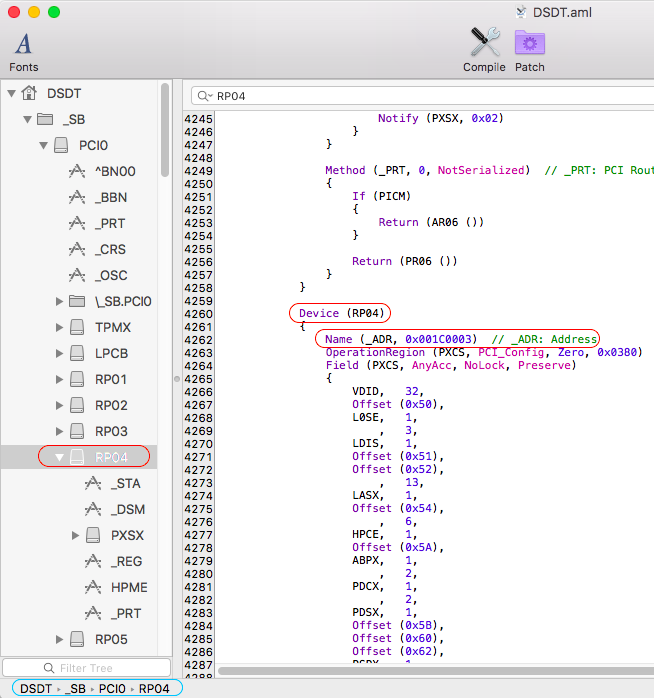
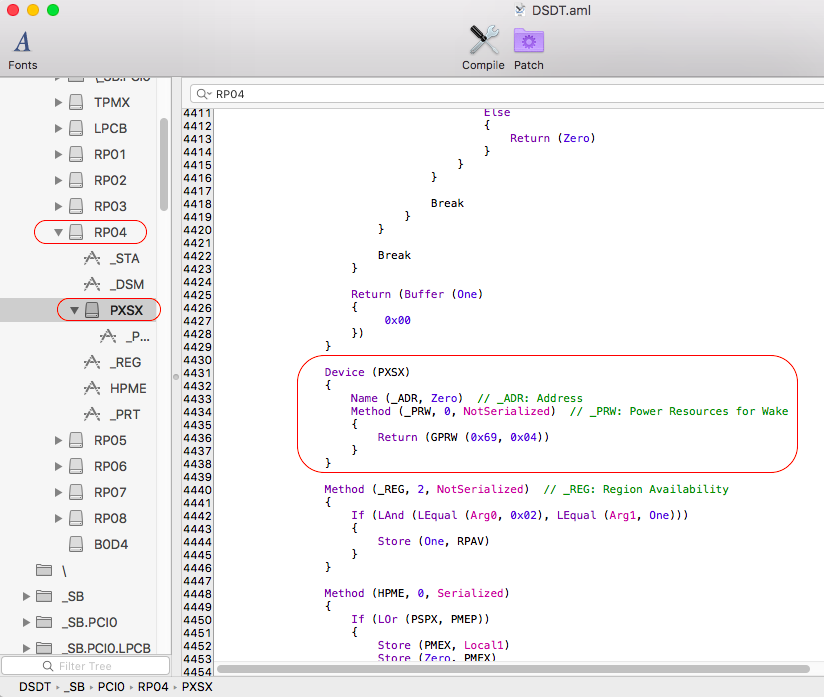
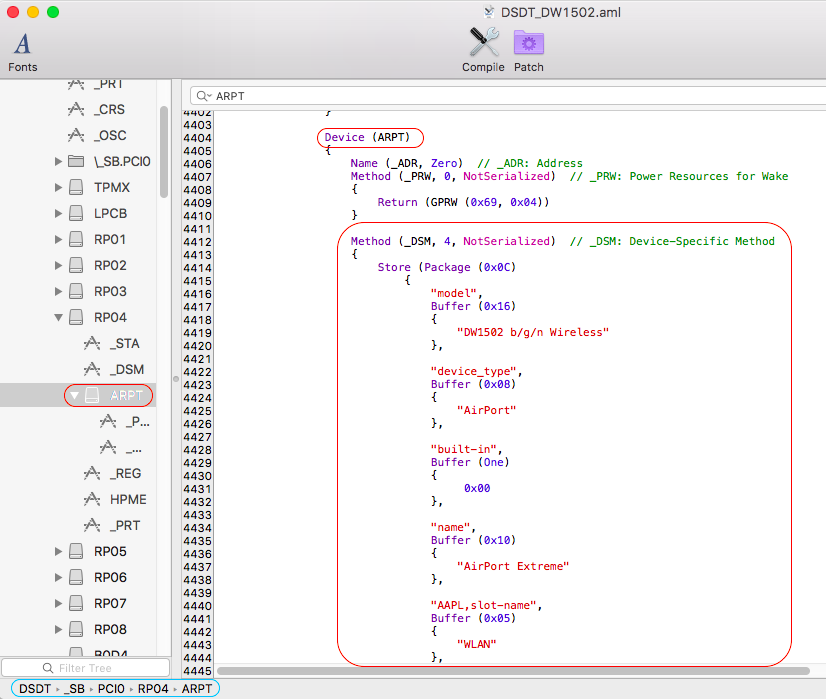
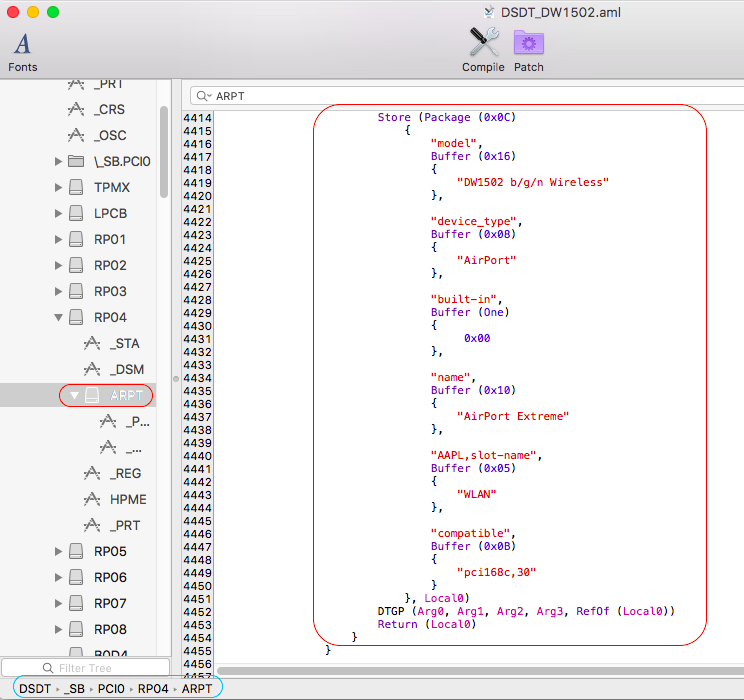
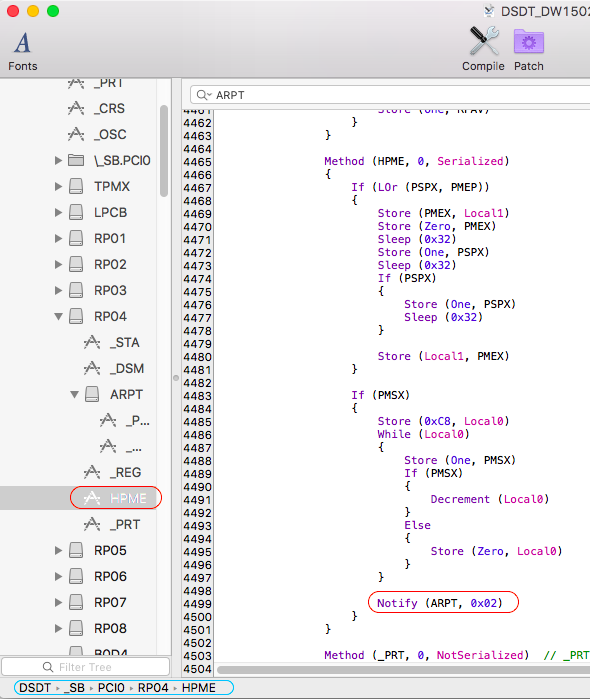
Keep a backup of your previous DSDT somewhere and replace it with the following revised patched version (rename it to DSDT.aml or call it as DSDT_DW1502.aml in the boot loader). DSDT_DW1502.aml.zip Your IOReg shows your DW1502 card with id 168c,2b under device PXSX attached to device RP04@1C,3: In DSDT, we therefore look for that device RP04 at address 0x001C0003 (=1C,3): We find the device PXSX attached to it: Then we apply the published patch.1) we rename device PXSX to ARPT (common Apple wireless device name) and inject the _DSM method that declares compatibility with supported Atheros AR9380 chip 168c,30 (only the "compatible" statement is mandatory, rest is just cosmetic): 2) At compilation, an error message reports that there is a reference to an unknown device PXSX under HPME. We therefore rename this old reference to RP04.PXSX to ARPT: That's it, table now recompiles without error! Your DW1502 should now always work under any version of OS X that natively supports Atheros AR9380 chip.
-
Yup, Ivy Bridge i3 CPUs don't have Turbo boost at all and the i3-3110M runs @2.4GHz and that's it. So you can't disable something not available... To be honest, I never use that Turbo-disabler-on-battery kext. My laptops run at full performance capacity all the time.
-
E7440: problems during Sierra installation with Clover 3998
Hervé replied to dctacsi's topic in The Archive
Please post your DSDT + saved IORegistryExplorer output. Both zipped. -
Maybe because it was compiled with another tool such as DSDTEditor or the file is corrupt.
-
BIOS upper limit for OS X should be around same version as for the E6230, i.e. A11. It could be A12 of course but I don't think you can go much higher... Do a Search on the forum on "E6330 BIOS" and see what you find... Failing that, best way to know is to try until your graphics go bad, then reverse to oldest possible version like A02 and upgrade again to the highest safe version. I'd bet money on A11.
-
[Solved] E5420: display+LAN+audio issues with Yosemite and El Capitan
Hervé replied to amthb0's topic in The Archive
No, you're missing the point totally. You won't be able to boot your installed system unless you copy the /Extra folder and the necessary kexts to your freshly made OS X installation. Reboot your USB installer, go to the main installer screen and run Terminal from Tools menu. Then copy the Extra folder from your USB key to your freshly made OS X volume/partition. diskutil list -> to identify the name of your freshly made OS X volume/partition cp -Rf /Extra /Volumes/<name of identified OS X partition> ` I can only advise you to read my Chameleon/Enoch-based Yosemite/ElCapitan/Sierra guides posted here to familiarise yourself with the actual installation process. Until you fully understand it, you will probably not succeed. This being said, you must have managed to copy something to be able to boot OS X. Maybe you're actually using distros... But if you've not copied the Extra folder, you're missing the DSDT so you'll have to manually set DualLink through Chameleon boot option EnableDualLink=Yes. You may add Injectntel-ig=00000100 but that's probably not necessary with HD3000. If in doubt, type "?" at Chameleon prompt and you'll see some help on the boot flags and options.