
Hervé
-
Posts
10098 -
Joined
-
Last visited
-
Days Won
569
Content Type
Profiles
Articles, News and Tips
Forums
Everything posted by Hervé
-
This is an E6530 with nVidia NVS 5200M which is totally unsupported beyond OS X El capiton 10.11. You have to enable Optimus in BIOS, then disable the nVidia dGPU through ACPI patching (DSDT or SSDT) to run solely on HD4000 iGPU. HD4000 is last officially supported in Catalina but remained natively supported in Big Sur with a little trick on the SMBIOS and boot arg side. It's unsupported with special patches in Monterey and, I guess, Ventura. Your OC config is largely unsuitable to old E6x30 Ivy Bridge laptops. You're trying to apply an config meant for Broadwell or later platforms and that's incorrect. For instance: the graphics properties you inject for HD4000 iGPU in your OC config are incorrect: no need to patch fbmem or stolenmem the way it's done for Broadwell iGPUs and later; all you need to patch is reduce fbmem from 16MB to 8Mb to avoid graphics corruption on screen. you've specified the target Capri framebuffer layout incorrectly; use little endianness, not big endianness. no such thing as I2C keyboard or TouchPad on on the E6x30; you need to use good old kexts for ALPS TouchPads. SMBIOS MBP11,1 is for Haswell/HD4x00 platforms, not for Ivy Bridge/HD4000 ones What version of macOS are you trying to install and run? Please try to, at least, provide the bare minimum required to obtain support. Do consult the various Latitude E6x30 guides available in our Guides section as well as the Hardware info section where you'll find information about supported platforms, supported macOS versions, etc.
-
 Disk mode (RAID/AHCI/IDE) is something you set in BIOS. Do consult your product's documentation on Dell support web site.
 -
Remove those manually, then reboot.
-
Weird, but the card certainly appears to be properly detected and registered when you inject the compatibility with pci14e4,43a0 statement. It's just that wireless is turned off. No way to turn it back on through the Wireless PrefPane?
-
That card is based on a chipset natively supported by macOS; as such, you should not require any add-on kexts to get it working.
-
Looks like you've retained settings for a DW1560 card in your configuration... You may want to review that. DW1830's PCI is 14e4,43ba remains natively supported by AirportBrcmNIC kext so I was not expecting you to require declaring compatibility with 14e4,43a0.
-
Not sure you need these boot args: agdpmod=vit9696 igfxagdc=0 Also try and add the ACPI patch that renames GFX0 to IGPU through Whatevergreen kext should normally take care of that.
-
@Senia Suazo Yes, those graphics settings are Ok but, if you've made changes to your OC config, remember to reset NVRAM from the OC Picker at next reboot.
-
Even though a Skylake iGPU is listed with 1536MB, you don't appear to have graphics acceleration in place (Finder's bar + Dock should be translucent, not greyed out). For Monterey, make sure you use the following settings on your Skylake/HD 520 laptop: MacBookPro13,1 SMBIOS SKL framebuffer layout 0x19160000 iGPU id 0x1916 of your i7-6600u is fully and natively supported so no need to inject it as a property (does no harm though of course). Nothing more to setup for graphics is video memory is set to 64MB in BIOS as stated by Jake. You may only need to patch the connector used for HDMI output if you need/want HDMI audio. Don't hesitate to look here for pointers (my Latitude E7270 is also fitted with i7-6600u CPU + HD 520 graphics) and post a zipped copy of your EFI folder.
-
http://www.linux-usb.org/usb.ids 05ac:820a is an Apple Bluetooth keyboard so clearly not the built-in one.
-
[Solved] E7440: Instant wake with BCM94360CS2 card in WWAN slot
Hervé replied to gelomon's topic in The Archive
Yes, sorry I indeed made a confusion thinking you had the Intel card in that WWAN slot when it's clearly a half-size mini-PCIe card you had in the WLAN slot. E7270's WWAN slot is M.2 Key B so unsuitable for Key A/E Wifi/BT cards. What I meant was that, in the case of my E7270, there is no instant wake issue due to replacement GPRW method not caring for values provided in the GPRW (0x69, 0x04) call programmed under the WLAN ACPI device. It'd be interesting to see what call is made in your DSDT under the RP0x.PXSX device used by the WLAN card/slot. -
Latitude E6520: OpenCore won't even show macOS in boot picker
Hervé replied to yassinebz's topic in The Archive
Afaik, Sandy Bridge Latitude E6x20 laptops do not support installation of OS X/macOS from a USB key/disk in UEFI BIOS mode, only legacy mode. Thereafter, once OS X/macOS has been installed, you may indeed switch to UEFI BIOS mode and, provided you've installed your bootloader accordingly, OS X/macOS will boot and run Ok from internal disk in UEFI mode; I've detailed this in my E6220 guide. Taking that into account, you'll probably have to use Clover rather than Opencore, at least to boot in legacy mode. Is it an E6520 with HD3000 iGPU only or is it also fitted with the Fermi-based nVidia NVS 4200M dGPU? Former is supported OOB up to macOS High Sierra 10.13 (with patches in later macOS versions though poorly supported in Big Sur and later), latter up to Sierra only (no support in later versions). Don't hesitate to read the existing E6x20 threads and guides available on our forum. An E6520 with nVidia graphics will require that you enable Optimus in BIOS (to be able to run on HD3000 iGPU), then disable the dGPU via SSDT to prevent it from draining your battery unnecessarily. If Optimus is disabled, only the dGPU is available. Please note that, in old OS X El Capitan 10.11 and all subsequent macOS versions, HD3000 gets buggy over time and you'll experience graphics artefacts, like horizontal lines across the screen or pixelisation. There are no fixes for this, only reboots will do. Note that, even though they run Win10/Win11 just fine, those E6x20 laptops are to be considered obsolete for Hackintosh purposes. NB: Don't use distros, we don't support those here. -
[Solved] E7440: Instant wake with BCM94360CS2 card in WWAN slot
Hervé replied to gelomon's topic in The Archive
Interesting... No such additional patches required on my E7270 which is fitted with a BCM94360CS2. The card also attached to RP05.PXSX and _PRW method does call on GPRW with (0x69,0x4D) arguments; same applies to SD card reader attached to RP11.PXSX. Add-on patched table SSDT-GPRW.aml does not care for Arg0 being set to 0x69, yet sleep works perfectly well. On the PCIe side, it's kinda weird that wake was working when you had an Intel card in that slot but not when the BCM94360CS2 was installed. Hence why I assumed it would be the USB-based Bluetooth module that caused instant wake. Well done on your fix. -
Don't know how you managed to miss it !

-
Probably not booting because the bootloader was not properly installed, then.
-
Dell Latitude E6440: Unable to install macOS Ventura
Hervé replied to shyamsingh's topic in The Archive
OC not configured properly; check your OC setup/files/version/etc. -
Dell Latitude E6440: Unable to install macOS Ventura
Hervé replied to shyamsingh's topic in The Archive
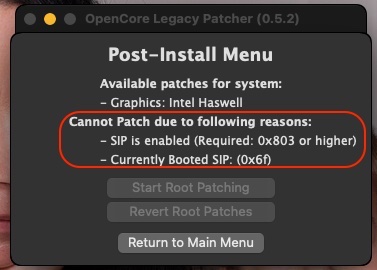
You don't need OCLP to install Ventura and I would advise you not to use that tool for installation. OCLP is meant for real Mac computers, not Hackintosh. You've only posted a copy of your OC config file so I can only comment on that: I see a lot of references to E7440 stuff (eg: E7440-SSDT.aml or USBPort_E7440.kext) you use correct MBP14,1 SMBIOS for a regular Ventura installation (i.e. non-OCLP) if you use MBP14,1 SMBIOS, why do you use -no_compat_check boot arg? latest versions of Lilu fully support Ventura so why use -lilubetaall boot arg? Indeed, Ventura dropped support for Haswell HD4200/HD4400/HD4600 and associates so you do need the OCLP graphics patch but in a post-installation phase. So: make a regular Ventura installer (not n OCLP one) install Ventura with MBP14,1 SMBIOS cleanup your setup to remove the unecessary boot args and use the proper ACPI tables + USB port mapping kext install Haswell HD4x00 graphics patch withOCLP at post-install if the OCLP patch requires to return to MBP11,x or MBA6,2 SMBIOS, then, yes, you'll need the -no_compat_check boot arg -
[Solved] E7440: Instant wake with BCM94360CS2 card in WWAN slot
Hervé replied to gelomon's topic in The Archive
As I said, you ned to adjust the power settings attached to the USB port supporting the Bluetooth module of your card. Check your IOReg + ACPI tables. -
[Solved] E7440: Instant wake with BCM94360CS2 card in WWAN slot
Hervé replied to gelomon's topic in The Archive
The slot in question is combo mSATA/WWAN and therefore supports USB on top of SATA + PCIe services. Instant wake is often due to a device not going in sleep mode because it is not powered down; in your case, it would have to be the USB-based Bluetooth module of the card. I'd say you need to adjust power settings of your USB ACPI devices since I expect the WWAN slot was not initially taken into account given that there was no USB device attached to it. I encountered a similar issue when I replaced a (wifi-only) DW1510 card by a (combo Wifi/BT) BCM94360CS2 in my Vostro 200 desktop. See here for details (in my case, a patched DSDT is used; in your case, I expect you use a SSDT). Don't understand what you say about your assertion log and the "Keyboard working fine and not causing instant wake on the Intel Wifi" statement. I fail to see the link between your keyboard and the Intel wireless cards. Anyway, your Intel Wifi may not be fitted with Bluetooth or, at least, a bluetooth module that was detected in macOS. Check your USB ports in SysInfo... So, as indicated above, identify the USB port used by your card and patch/adjust the associated UHC/EHC/XHC ACPI device accordingly. -
Boot in verbose mode to see where things hang.
-
For increased visibility, I'm re-posting here the kext recently compiled by @gelomon whom I thank for his work. Details are available in this thread. It's applicable to Alps Touchpad v3-v5 as fitted to Dell Latitude models such as the E5x40 or E7x40. VoodooPS2Controller.kext.zip
-
https://osxlatitude.com/articles/news/macos-ventura-is-out-r74/
-
Could be due to missing HFS module/driver for Clover; try and add this to your CLOVER/drivers/BIOS and/or CLOVER/drivers/UEFI folder: HFSPlus.efi.zip How did you install Clover, if at all? Through an installation package, in which case which version? Or did you simply copy the EFI without making any specific Clover installation?
-
Ventura dropped support for anything older than Kaby Lake and therefore older than Intel HD61x/620/630 graphics. So, indeed, you'll need to apply the graphics patch offered by latest version of OCLP (v0.5.0 being the earliest one for such Ventura patches). Be careful given that OCLP really is a tool for real Mac computers not Hackintosh computers. Only install the graphics patch and nothing else. You'll probably have to keep Broadwell MBP12,1 SMBIOS and boot with -no_compat_check boot arg to boot Ventura and then apply the OCLP patch. I've not had to use the tool on any of my Hackintoshes (only on a real iMac) but I guess you'll only use it in post-install phase, i.e. do not make a macOS installer for your Hackintosh with OCLP. Make sure to read the OCLP documentation thoroughly and keep in mind that, at this point of time, the OCLP Ventura patches remain in beta stage and aren't bug free. https://dortania.github.io/OpenCore-Legacy-Patcher/POST-INSTALL.html#applying-post-install-volume-patches https://github.com/dortania/OpenCore-Legacy-Patcher/issues/1008 https://github.com/dortania/OpenCore-Legacy-Patcher/releases If you want a fully and properly working Hackintosh, wisdom dictates you stick to Monterey for the time being.
-
Dell XPS 12 9q33: need help to install macOS Ventura
Hervé replied to adduvin83's topic in Other Dell laptops
Well it is CoolStar's kext but it's clearly not loaded at boot loader's menu given that macOs has not even launched at that stage yet so something else drives it there...