
Hervé
-
Posts
10099 -
Joined
-
Last visited
-
Days Won
569
Content Type
Profiles
Articles, News and Tips
Forums
Everything posted by Hervé
-
The old Lion RTC patch should be considered ineffective on recent OS X versions such as Mavericks and/or Yosemite for which the patch is actually slightly different. See here for instance.
-

Yosemite Installation Guide - Latitude E5440 Intel i5 - Clover UEFI
Hervé replied to jorgexgb's topic in The Archive
Intel not supported. Replace it. https://osxlatitude.com/index.php?/topic/2120-supportedunsupported-wireless-cards-inventory/ -
Ho ho... if you read the guide with all due attention, you should notice that it's not a simple matter of dragging and dropping kexts from the pack to replace vanilla ones... There are Terminal commands to follow. It's a pretty standard thing that part, nothing new really: it's the kexts permissions repair + bootcache/prelinked kernel update process. Did you do that?
-
Yes, the SLE folder inside the bootpack means the kexts inside actually go to /S/L/E to replace the vanilla kexts. Otherwise, they do not work, as you've experienced with AppleHDA. Once you've replaced the vanilla AICPUPM kext in /S/L/E by the patched version, you can remove NullCPUPM from /E/E to keep it aside. You'll then be able to run full native CPU speedstep. DisableTurboBoostBattery and IOAHCIFamily really are optional. The former is to disable CPU turbo boost mode when laptop is running on battery to save it, the latter was used up to 10.10.3 to support TRIM on non-Apple SSD. From 10.10.4, Yosemite provides a built-in command to handle that, so it's no longer required. Enjoy that little machine, it makes for a great Hackintosh, very fast & responsive, especially with a SSD.
-
To summarize things: Unmodified DSDT at discrete GPU level (device (VID) under Device (AGP)) MacBookPro5,1 profile Recent Kozlek's FakeSMC kext tuned with 1.33f8/smc-mcp SMC parameters AGPM kext patched with new MBP5,1 entry for Vendor10deDevice06eb with Control-id set to 18 and adjusted idle loads -> Full native CPU SpeedStepping + NVS 160M GPU throttling at all times, including after sleep.
-
No need to patch AICPUPM for Arrandale CPUs, it's only required for Sandy/Ivy Bridge CPUs. Just make sure to have a tuned up FakeSMC kext, the right SMBIOS profile and P+C States generation activated. If you use NullCPUPM, well... its name should be self-explanatory...
-
Yep, you can read reports/results of some other 10.11 installations in the R&D->Other research forum subsection.
-
The bootpack is basically that "Extra" folder you install on the USB installer when you create it with myHack. If you did not use any, your USB installer is unlikely to boot. At minimum, you would use the default one provided by myHack.
-
Can you post us the bootpack you've used on this Mavericks 10.9.0 myHack USB installer? I would also suggest you add -f flag at startup to bypass cache. No discrete graphics on this Lenovo apart from the integrated Intel HD 1st gen? If 1st gen Intel HD only, check your display connector to verify if you can benefit from full graphics acceleration or not. http://www.insanelymac.com/forum/topic/286092-guide-1st-generation-intel-hd-graphics-qeci/
-
You can only do so if you have Clover: it will install a new partition on the HDD from which you'll then be able to proceed with a brand new install. With Chameleon, which is the normal bootloader of a myHack-based installation, you'll have to proceed with a brand new installation from scratch. However, you can safely install Yosemite over your existing Mavericks partition and it'll keep all your apps and files in a similar way to an actual update/upgrade.
-
Confirmed to work on E6400 with nVidia Quadro NVS 160M 256Mo (PCI id 10de/06eb) too.The same patch as provided for D630 above can safely be re-used on that laptop, the NVS 160M being based on GeForce 9300M GS; just change the device id in the patch (obviously). <key>Threshold_High</key> <array> <integer>37</integer> <integer>45</integer> <integer>54</integer> <integer>80</integer> </array> <key>Threshold_Low</key> <array> <integer>0</integer> <integer>40</integer> <integer>60</integer> <integer>75</integer> </array>
-
We can only integrate a model if a user provides the files out of an existing installation. If the specs of the G580 are similar to those of your G500, you may use the G580 bootpack.
-
Well, you have not even posted a single file you've used or modified, so... We could certainly post an empty bootpack but that wouldn't be of much use, would it?
-
Try with a Virtual Machine rather than a distro; distros are problematic (some say evil) as you don't know what's been added to them. A vanilla and well-controlled installation is always a million times better.
-
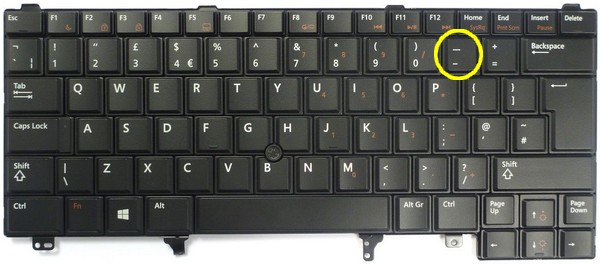
At that point, your keyboard will be in basic/standard US QWERTY mode, so you need to find the key for the dash ("-") character. Should be the 2nd key to the left of the [ (=backspace) key found above [ENTER] key.

-
No, you interrupt the bootloader startup by pressing a key, then you type (on the keyboard): -f -v
-
You need to replace AppleIntelCPUPowerManagement.kext located in /System/Library/Extensions by a patched (=modified) version available here. This applies to all Hackintosh systems running on a Sandy Bridge or Ivy Bridge CPU.
-
Did you read this? https://osxlatitude.com/index.php?/topic/7914-dell-latitude-e6220-with-intel-i5-2520m-hd3000-and-1366x768-lcd-mavericksyosemite/ PS: You can't break or damage anything...
-
Well, you'd actually be very ill-advised to attempt upgrading to Yosemite! OS X does not support Intel GMA950 graphics beyond Lion 10.7.5 and such support is limited to 32bit kernel mode. From ML, no drivers for obsolete Intel GMA graphics controllers and kernels+kexts are all 64bit only. So the most recent OS X version that will run with full hardware support on your D520 is: Lion 10.7.5 (in 32bit kernel mode) if you have a 64bit Core2Duo CPU Snow Leopard 10.6.8 (in 32bit kernel mode) otherwise
-
Yes, I meant that parameter. Layout-id 0a260006 is indeed the usual one for mobile HD4400/HD4600, but you may experiment with other values if it does not work.
-
Everything is absolutely normal. For graphics, the raw DSDT uses Device (VID), itself under Device (AGP). If you read my AGPM tuning thread, you'll notice the D630's DSDT is identical in that respect. I would recommend you forget about modding the DSDT and simply add an entry for Vendor10deDevice in the MB5,1 section of the AGPM kext's Info plist, adjust control-id to 18 and, in all ikelyhood, Bob's your uncle! If it did not work, move to MBP5,1 instead of MB5,1.
-
Generally speaking, you can share Windows devices and/or filesystems/folders with a non-Windows system such as one running OS X. For a printer, the Bonjour service will probably be the easiest option. For file/filesystem sharing, connect to the server as an SMB target from OS X. The option is available directly from the Finder's bar menu. Google for this and you'll find dozens of links with all details. I would not expect things to be different with Win10. If the printer is wireless, you may want to look at possibility to access it directly from your Hackintosh; it only just depends on the make & model and availability of drivers for OS X.
-
Yes, it may just be that your particular Intel model is somehow "slow" to respond to BIOS or adapter sensing and thereby somehow not 100% compatible or suitable. If you read the previous posts in this thread, you will see several positive reports with various non-Intel mSATA SSDs, whilst there is a previous negative report about an 80Go Intel 310 Series model. To me, no need to look further, it's probably the SSD itself. mSATA SSD tested/reported OK: Plextor PX-128M5M 128Go Crucial M4 256Go MyDigital BP4 240Go Lite-On LMT-256L9M 256Go Samsung SM841N 256Go mSATA SSD tested/reported NOk: Intel 310 Series 80Go Other mSATA SSD candidates: Kingston SMS200S3 120Go ... I must admit I've experienced disappointments with other Intel SSD too: I have a "regular" 2.5" Intel 330 series in my D630 and it slows down dramatically if I enable TRIM on it. I've never experienced such things with SSD from a different make.
-
True, but during performance tests we ran a couple of years ago, we did notice that MBP5,1 profile face a better performance and GPU throttling than the MB5,1. Regarding DSDT, the file you posted refers to Device (AGP) and you said you renamed it to GFX0. Isn't the case any more? Anyway, you know what to do now, the AGPM tuning thread should be sufficiently explanatory.
-
By the way, you probably would not get anywhere with DSDT editing and renaming APG device to GFX0 on a MacBook5,1 SMBIOS profile; If you check your AGPM Info plist, you should see that the entry associated with that model only caters for the integrated chip (IGPU). You really should opt for a MacBookPro5,1 SMBIOS profile, tune the system as per the dedicated thread and article, then proceed with AGPM tuning.