
Hervé
-
Posts
10098 -
Joined
-
Last visited
-
Days Won
569
Content Type
Profiles
Articles, News and Tips
Forums
Everything posted by Hervé
-
You're not using exactly the same Clover config as that provided in my guide... A few questions: which BIOS version is your E6230 running? If it's an older one, make sure to update to latest which is A20 afaik. which version of Clover are you running? r5119 highly recommended though I must admit that, after putting r5120 aside due to issues/bugs; r5122 appears to run Ok. what CPU is your E6230 fitted with? Your Clover config is using an SSDT generated for an i7-3540M CPU for power management purposes.
-
Works perfectly for me and several others. Verified this from Safari/Edge/Chrome/Brave, on my E6230 Hack + a couple of Windows PCs, logged in and not. I suggest you clear your browser(s)'s cache and retry.
-

How do I repair permissions and rebuild the cache in Yosemite to Catalina?
Hervé replied to Hervé's topic in FAQs & Tutorials
For Mojave and lCatalina, use the following kextcache command: sudo kextcache -i / For Catalina, system's folder lock-out must be lifted before anything can be applied. Use the following commands to that effect: sudo mount -uw / sudo killall finder -
No, never used it.
-
E5470 with i5 6440HQ + HD 530 + Full HD screen: seeking EFI for Catalina
Hervé replied to PMD's topic in The Archive
Same exact process, no difference whatsoever. It's totally CPU/keyboard independent. -
nVidia GeForce GT610 is Fermi and has no support since Sierra/High Sierra; last fully and properly supported in El Capitan. Start by replacing your graphics card by a supported model. Only nVidia Kepler cards are supported under Mojave and Catalina (eg: GK208-based GeForce GT710/720/730 and other previous model).
-
The PS2 controller kext I included in the packs of my guides provides adequate and suitable TouchPad sensitivity to me. I do not have to press very hard to tap and/or double tap. But tap is not enabled by default, you have to enable it in the TouchPad PrefPane. With regards to lid closure not leading to computer sleep, this can take several seconds (on occasion, a minute or two) during which you'll see disk activity before the power LED starts fading in & out but this requires that the hall sensor inside the laptop is : present properly connected to the motherboard's hall connector Check it out in the E6230 owner's manual. I've seen the wire disconnected from the sensor itself in the past...
-
Your system freezes during startup due to something missing or very incorrect in your setup. Try and revert to your previous config file.
-
DW1520 is fully supported, just not natively. All appropriate details in our Wifi forum sub-section (inventory + AirPortBrcm4360 patching thread) if you care to search... NB: your Clover config needs serious revisiting.
-
E6230 Catalina 10.15.6 : Freeze after wake up from sleep
Hervé replied to Amaleic's topic in The Archive
You said you have no battery; try and remove the battery manager kext... Or buy a new one. You may also update FakeSMC (& PlugIns) to Rehabman's last version (v1800) though I doubt it'd have any effect to be honest. -
Moved to dedicated Big Sur beta section...
-
Indeed, cannot be a DW1560; maybe DW1550 in which case the same patches as used with Mojave need to be applied.
-
Looking at your Clover config, I'd say you've got no proper CPU power management in place and your graphics settings may be incorrect too. Open your Clover config in Clover Configurator app and try the following in ACPI tab: add GFX0 to IGPU patch remove the SSDT table drops you applied remove NoOEMTableId + NoDynamicExtract SSDT options remove FixIntelGfx fix add PluginType generate option With regards to SMBIOS: iMac14,1 used Haswell Iris Pro 5200 iGPU iMac14,2 and iMac14,3 used nVidia Kepler dGPUs iMac14,4 and Macmini7,1 used Haswell HD5000 iGPU iMac15,1 used AMD dGPU As such: change your SMBIOS to iMac14,4 or Macmini7,1 Save your revised config in a separate file that you'll call from Clover Options->Config menu once you reach Clover's main boot screen.
-
E6230 Catalina 10.15.6 : Freeze after wake up from sleep
Hervé replied to Amaleic's topic in The Archive
It only tends to do so after updates. Not in between afaik. It's been known and mentioned for years and it's clearly stated in the FAQ thread. -
A little Search on the forum would have avoided you all that hassle and expenditure, do think of using the facility in the future... BCM4352 is not supported OOB and requires either a DSDT patch or a kext patch or device id faking or direct property injection in order to make it work. The easiest thing to do is inject a compatibility statement with BCM4360 (14e4:43a0) in the bootloader config against the relevant and previously identified ACPI/IOReg device. All details are available in our R&D->Wireless and Bluetooth forum section (inventories, dedicated threads). You probably had patched or replaced the AirPortBrcm4360 PlugIn kext of IO80211Family in /S/L/E prior to your last update and that got replaced with a vanilla version after the update. That's to be expected. Hence why /S/L/E should always remain full vanilla in favour of alternatives (properties injection, kext installation in /L/E, etc.). Only you could tell what you had...
-
E6230 Catalina 10.15.6 : Freeze after wake up from sleep
Hervé replied to Amaleic's topic in The Archive
Yes, you've got everything right and I believe you have the correct generated SSDT table for your CPU. However, you may switch from standard CPU power management with AICPUPM + Clover AICPUPM patch + CPU-specific SSDT to Kernel CPUPM (XCPM) in order to run a totally CPU independant setup; it works on our Ivy Bridge E6230: remove the SSDT files from CLOVER/ACPI/patched subfolder in Clover EFI folder remove the dropping of DMAR + SSDT CpuPm + SSDT Cpu0Ist tables in Clover config (ACPI section) disable AppleIntelCPUPM patch in Clover config (Kernel & Kexts Patches section) enable KernelXCPM + KernelPm patches in Clover config (Kernel & Kexts Patches section) update Clover r5119 but don't go higher (XCPM not working with Clover r5120 and later) -
E6230 Catalina 10.15.6 : Freeze after wake up from sleep
Hervé replied to Amaleic's topic in The Archive
Try and switch to sleep mode only rather than hibernation and delete the sleepimage file. All details are posted in our FAQ section. -
Your Broadwell/HD5500 laptop, will run all recent macOS versions, from Mojave to Catalina and future Big Sur. I suggest you consult our threads about OS X/macOS minimum requirements and GPU compatibility for further details.
-
2) Support for Intel cards is fairly new and remains pretty basic. Afaik, there is no native support to date. My advise is that you replace that card with a fully compatible and fully supported Broadcom card. 3) Sounds like you've not setup CPU power management properly, I suggest you consult Jake's own E7470 guide to properly setup your laptop. I very much doubt Windows would allocate 12GB (!!!) of RAM for video/graphics. 1536MB is what you ought to expect under macOS, that's the default VRAM allocation on any MacBook since Haswell generation. The property injection Jake gave you increases this to 2GB. macOS will never use more than that with an iGPU, it's not designed so.
-
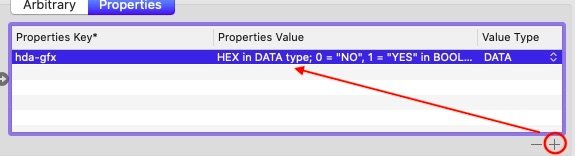
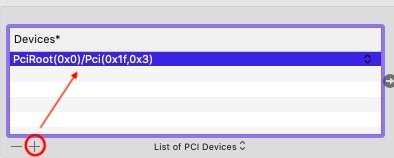
Using Clover Configurator, you need to click the small "+" button under each section to add data/properties. Here, you need to do the following under the Properties tab click on the + button under Devices block; a sample entry appears; just enter the address Jake has given you above click on the + button under Properties Key block; a sample entry appears; just enter the property key, value and type Jake has given you above Then save your config and reboot for the property injection to take effect. Consult the Clover wiki for information and instructions regarding configuration.

-
Tuh tuh tuh... Big Sur was announced compatible with models not older than MacBook Pro late 2013 and MacBook Air 2013. None of these include Ivy Bridge/HD4000 platforms. Expect support to start at Haswell only... https://www.apple.com/macos/big-sur-preview/ This being said, Big Sur beta so far supports Ivy Bridge HD4000 graphics (IntelHD4000 + Capri framebuffer kexts are present) so you should be Ok for the time being. Maybe not when final version gets released at fall.
-
You could work it out, really. It'll be more or less the same pack as, say, Sierra, with the added complexity of: telemetry plugin replacement nVidia Tesla kext installation and workarounds And double check your Embedded Controller of course as per the Catalina requirements thread pinned to "Our Picks" list. Follow what I detailed in my D630 guide.
-
And full of bugs...
-
You probably to redefine your USB ports mapping correctly with Hackintool app.
-
Nope, unsupported; that'll be High Sierra minimum...